For small to mid-sized businesses comparing CPQ tools, choosing the right platform often comes down to flexibility, pricing transparency, and how much complexity you actually need.

Convert_ is a Configure One alternative designed for small to mid-sized businesses that want advanced pricing logic without enterprise CPQ complexity.

This guide, updated for 2026, compares Convert_ and Configure One across calculations, usability, customization, support, and pricing. It helps you decide which solution fits your business model.

Key Takeaways: Convert_ vs. Configure One

  • Convert_ is better suited to small and mid-sized businesses.

  • Convert_ offers advanced pricing logic without enterprise CPQ complexity.

  • Configure One focuses on structured manufacturing workflows but typically requires training and technical resources.

  • Convert_ provides a free plan and transparent pricing, making it easier for teams to test, iterate, and scale without a large upfront commitment.

  • If you need 3D imaging, Configure One is the option for you, as Convert_ focuses on building complex 2D logic-based product configurators.

  • Using interactive configurators with Convert_ can significantly increase inbound leads, as shown by Ellio’s 4x lead growth after implementing a product configurator.

Comparison Table for Convert_ and Configure One


Convert_

Configure One

Ideal For

Small to medium businesses, all industries

Mid to large manufacturers

Free Plan

Free platinum features until you see results (100 visits)

Not available

Advanced Calculations

Powerful calculations with FormulaScript

Decent for basic quoting but does not use conditional logic

User Experience

Easy to use with drag-and-drop functions

User interface can confuse some users

Customization

Highly customizable with custom branding, forms, templates, and more

Customizable branding but lacks deeper customization

Support

Excellent support options and customer response

Fantastic support and very responsive to users

Pricing

Subscription model with free starter plan and low barrier to entry

Higher barrier to entry with no free plan or trial

What is Convert_?

Convert_is a no-code platform for building product configurators, CPQ tools, interactive calculators, quoting tools, forms, surveys, landing pages, and more.

While it can be used as a product configurator, it extends beyond traditional CPQ use cases by combining:

  • Advanced calculation logic

  • Lead capture and qualification

  • Real-time pricing and quoting

  • Sales funnel automation

Convert_ is designed for businesses that need flexible pricing logic and customization without enterprise CPQ overhead or development resources.

hWknsudBHYzBXECnj

What is Configure One?

Configure One is an enterprise CPQ platform helping manufacturers sell complex, highly customized products.

It allows businesses to:

  • Configure products with multiple variables

  • Apply pricing rules and bill of materials

  • Generate quotes for custom configurations

  • Support manufacturing workflows

Configure One is commonly used by manufacturing companies with long sales cycles, technical product requirements, and internal sales teams that can support training and implementation.

How Do Convert_ and Configure One Features Compare?

We’ll do a direct comparison for Convert_ vs. Configure One for each of the following features:

  • Free plan

  • Calculations

  • User experience

  • Customization

  • Support

  • Pricing

Free Plan

Trying a tool before committing is often critical for smaller teams.

Does Convert_ offer a free plan?

Yes, Convert_ offers a free forever plan for up to 100 monthly visitors. All core features are available, allowing you to:

  • Build calculators, forms, and product configurators

  • Test complex pricing logic

  • Embed tools on your website

  • Validate real use cases before upgrading

This makes Convert_ accessible for businesses with lower traffic or early-stage sales processes.

Does Configure One offer a free plan?

No, Configure One doesn’t offer a free plan. Access typically requires a sales-led onboarding process, which may not suit teams looking to experiment or move quickly.

Calculations

Can Convert_ handle advanced calculations?

Yes, Convert_ can handle advanced calculations.

Convert_’s calculation engine is built around FormulaScript combined with conditional logic.

This allows businesses to:

  • Create multi-variable pricing models

  • Use comparisons, functions, and branching logic

  • Support tiered pricing and complex rules

  • Generate instant, accurate quotes

This approach is well-suited to businesses with evolving pricing models or non-linear configuration paths.

Can Configure One handle advanced calculations?

Configure One supports structured pricing calculations, including bill-of-materials logic.

While effective for standardized manufacturing workflows, it can be less flexible when pricing logic becomes highly dynamic or when rapid iteration is required.

If you need to perform complex calculations at speed, you need Convert_.

User Experience

A huge part of success for software is its usability. It needs to be user-friendly and easy to navigate.

Convert_ edges the contest for user experience.

Is Convert_ easy to use?

Yes, Convert_ is easy to use. The platform has a no-code, drag-and-drop builder that allows users to:

  • Create and rearrange elements visually

  • Build calculators and configurators without development work

  • Deploy tools quickly with minimal setup

This lowers the barrier to entry for teams without technical backgrounds. You can easily build, maintain, and update your product configurators yourself, without extra support or expensive developers.

Is Configure One easy to use?

Configure One is harder to use than Convert_. The interface can require onboarding and training. Implementation effort varies by project complexity, and some users rely on external support or internal technical resources.

Unlike with Convert_, building and making changes to your product configuration tools yourself can be difficult.

Customization

Customizable software for your website is crucial. You want a product configurator that matches your style and brand.

Is Convert_ customizable?

Yes, Convert_ is highly customizable. Customization in Convert_ includes:

  • Styling to match brand guidelines

  • Custom CSS

  • Editable templates

  • Custom fields and parameters

  • Logic-driven workflows

Most of this can be done without writing code, making it practical for marketing and sales teams. To add custom CSS, you’ll need to have knowledge of CSS styling language, but you only need to use this if you want to create highly-customized tools.

Is Configure One customizable?

Configure One supports branding customization and deeper functional changes through its API. However, this typically requires development expertise or vendor involvement.

Support

Everyone expects good customer support these days. And it's always fantastic when businesses deliver.

Both ConvertCalculator and Configure One offer incredible customer support.

Pricing

Convert_ Pricing

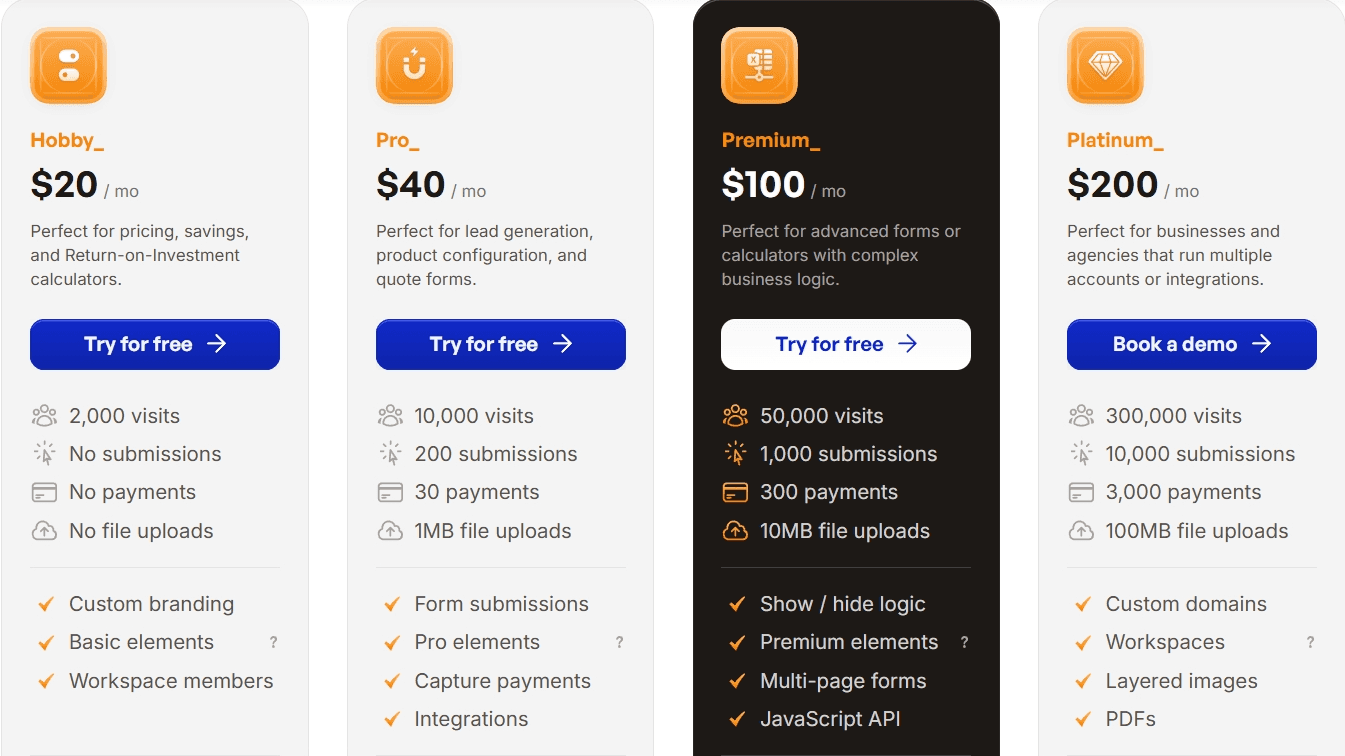
Convert_ uses transparent monthly pricing based on traffic volume and submissions. Here are the prices if you pay annually:

  • $20 per month for up to 2,000 visits

  • $40 per month for up to 10,000 visits

  • $100 per month for up to 50,000 visits

  • $200 per month for up to 300,000 visits

This structure allows companies to scale usage gradually. As your business grows, you can upgrade your plan to meet those needs.

Configure One Pricing

Configure One pricing generally starts at around $150 per month. But their pricing isn’t fully disclosed publicly. Pricing typically depends on implementation scope and enterprise requirements.

How Do Convert_Product Configurators Help Companies?

Building product configurators with Convert_ helps companies streamline pricing and qualification on their websites. Visitors can configure options, get a visual representation of the product, and get an exact price directly on the tool.

Ellio, an e-bike manufacturer, used Convert_ to build a product configurator for its website. Users are able to configure options and receive tailored outputs.

The configurator helped Ellio increase inbound leads by 4x. This goes to show how interactive configuration can outperform static forms for lead generation.

How Convert_ Helps You Create Product Configurators

Convert_ helps you create complex 2D logic-based product configurators (without coding skills). This is a massive benefit of using our software, as it reduces implementation time, setup costs, and ensures you have complete ownership over the process.

Our configuration tools are highly customizable, embed into any website, and offer seamless integration (natively and with 1000+ apps through Zapier).

Here are some features you can use to build 2D logic-based product configurators:

Getting started with Convert_  is easy.

Sign up for a free forever plan, choose a template, and customize it to suit your needs.

Final Verdict

Convert_ and Configure One both support product configuration and pricing, but they serve different types of businesses.

Choose Convert_ if you:

  • Need advanced pricing logic without enterprise CPQ complexity

  • Want transparent pricing and a free plan

  • Prefer no-code customization and faster deployment

  • Use configuration as part of a broader sales or marketing funnel

Choose Configure One if you:

  • Need 3D imaging

  • Operate in enterprise manufacturing

  • Require bill of materials-driven workflows

  • Have the resources to support training and implementation

For small to mid-sized businesses comparing CPQ tools in 2026, Convert_ offers a flexible and accessible Configure One alternative. Those who don’t need 3D product configurators will get more bang for your buck with Convert_.

If you’re unsure whether you need 2D or 3D configurators, these articles can help:

For small to mid-sized businesses comparing CPQ tools, choosing the right platform often comes down to flexibility, pricing transparency, and how much complexity you actually need.

Convert_ is a Configure One alternative designed for small to mid-sized businesses that want advanced pricing logic without enterprise CPQ complexity.

This guide, updated for 2026, compares Convert_ and Configure One across calculations, usability, customization, support, and pricing. It helps you decide which solution fits your business model.

Key Takeaways: Convert_ vs. Configure One

  • Convert_ is better suited to small and mid-sized businesses.

  • Convert_ offers advanced pricing logic without enterprise CPQ complexity.

  • Configure One focuses on structured manufacturing workflows but typically requires training and technical resources.

  • Convert_ provides a free plan and transparent pricing, making it easier for teams to test, iterate, and scale without a large upfront commitment.

  • If you need 3D imaging, Configure One is the option for you, as Convert_ focuses on building complex 2D logic-based product configurators.

  • Using interactive configurators with Convert_ can significantly increase inbound leads, as shown by Ellio’s 4x lead growth after implementing a product configurator.

Comparison Table for Convert_ and Configure One


Convert_

Configure One

Ideal For

Small to medium businesses, all industries

Mid to large manufacturers

Free Plan

Free platinum features until you see results (100 visits)

Not available

Advanced Calculations

Powerful calculations with FormulaScript

Decent for basic quoting but does not use conditional logic

User Experience

Easy to use with drag-and-drop functions

User interface can confuse some users

Customization

Highly customizable with custom branding, forms, templates, and more

Customizable branding but lacks deeper customization

Support

Excellent support options and customer response

Fantastic support and very responsive to users

Pricing

Subscription model with free starter plan and low barrier to entry

Higher barrier to entry with no free plan or trial

What is Convert_?

Convert_is a no-code platform for building product configurators, CPQ tools, interactive calculators, quoting tools, forms, surveys, landing pages, and more.

While it can be used as a product configurator, it extends beyond traditional CPQ use cases by combining:

  • Advanced calculation logic

  • Lead capture and qualification

  • Real-time pricing and quoting

  • Sales funnel automation

Convert_ is designed for businesses that need flexible pricing logic and customization without enterprise CPQ overhead or development resources.

hWknsudBHYzBXECnj

What is Configure One?

Configure One is an enterprise CPQ platform helping manufacturers sell complex, highly customized products.

It allows businesses to:

  • Configure products with multiple variables

  • Apply pricing rules and bill of materials

  • Generate quotes for custom configurations

  • Support manufacturing workflows

Configure One is commonly used by manufacturing companies with long sales cycles, technical product requirements, and internal sales teams that can support training and implementation.

How Do Convert_ and Configure One Features Compare?

We’ll do a direct comparison for Convert_ vs. Configure One for each of the following features:

  • Free plan

  • Calculations

  • User experience

  • Customization

  • Support

  • Pricing

Free Plan

Trying a tool before committing is often critical for smaller teams.

Does Convert_ offer a free plan?

Yes, Convert_ offers a free forever plan for up to 100 monthly visitors. All core features are available, allowing you to:

  • Build calculators, forms, and product configurators

  • Test complex pricing logic

  • Embed tools on your website

  • Validate real use cases before upgrading

This makes Convert_ accessible for businesses with lower traffic or early-stage sales processes.

Does Configure One offer a free plan?

No, Configure One doesn’t offer a free plan. Access typically requires a sales-led onboarding process, which may not suit teams looking to experiment or move quickly.

Calculations

Can Convert_ handle advanced calculations?

Yes, Convert_ can handle advanced calculations.

Convert_’s calculation engine is built around FormulaScript combined with conditional logic.

This allows businesses to:

  • Create multi-variable pricing models

  • Use comparisons, functions, and branching logic

  • Support tiered pricing and complex rules

  • Generate instant, accurate quotes

This approach is well-suited to businesses with evolving pricing models or non-linear configuration paths.

Can Configure One handle advanced calculations?

Configure One supports structured pricing calculations, including bill-of-materials logic.

While effective for standardized manufacturing workflows, it can be less flexible when pricing logic becomes highly dynamic or when rapid iteration is required.

If you need to perform complex calculations at speed, you need Convert_.

User Experience

A huge part of success for software is its usability. It needs to be user-friendly and easy to navigate.

Convert_ edges the contest for user experience.

Is Convert_ easy to use?

Yes, Convert_ is easy to use. The platform has a no-code, drag-and-drop builder that allows users to:

  • Create and rearrange elements visually

  • Build calculators and configurators without development work

  • Deploy tools quickly with minimal setup

This lowers the barrier to entry for teams without technical backgrounds. You can easily build, maintain, and update your product configurators yourself, without extra support or expensive developers.

Is Configure One easy to use?

Configure One is harder to use than Convert_. The interface can require onboarding and training. Implementation effort varies by project complexity, and some users rely on external support or internal technical resources.

Unlike with Convert_, building and making changes to your product configuration tools yourself can be difficult.

Customization

Customizable software for your website is crucial. You want a product configurator that matches your style and brand.

Is Convert_ customizable?

Yes, Convert_ is highly customizable. Customization in Convert_ includes:

  • Styling to match brand guidelines

  • Custom CSS

  • Editable templates

  • Custom fields and parameters

  • Logic-driven workflows

Most of this can be done without writing code, making it practical for marketing and sales teams. To add custom CSS, you’ll need to have knowledge of CSS styling language, but you only need to use this if you want to create highly-customized tools.

Is Configure One customizable?

Configure One supports branding customization and deeper functional changes through its API. However, this typically requires development expertise or vendor involvement.

Support

Everyone expects good customer support these days. And it's always fantastic when businesses deliver.

Both ConvertCalculator and Configure One offer incredible customer support.

Pricing

Convert_ Pricing

Convert_ uses transparent monthly pricing based on traffic volume and submissions. Here are the prices if you pay annually:

  • $20 per month for up to 2,000 visits

  • $40 per month for up to 10,000 visits

  • $100 per month for up to 50,000 visits

  • $200 per month for up to 300,000 visits

This structure allows companies to scale usage gradually. As your business grows, you can upgrade your plan to meet those needs.


Configure One Pricing

Configure One pricing generally starts at around $150 per month. But their pricing isn’t fully disclosed publicly. Pricing typically depends on implementation scope and enterprise requirements.

How Do Convert_Product Configurators Help Companies?

Building product configurators with Convert_ helps companies streamline pricing and qualification on their websites. Visitors can configure options, get a visual representation of the product, and get an exact price directly on the tool.

Ellio, an e-bike manufacturer, used Convert_ to build a product configurator for its website. Users are able to configure options and receive tailored outputs.

The configurator helped Ellio increase inbound leads by 4x. This goes to show how interactive configuration can outperform static forms for lead generation.

How Convert_ Helps You Create Product Configurators

Convert_ helps you create complex 2D logic-based product configurators (without coding skills). This is a massive benefit of using our software, as it reduces implementation time, setup costs, and ensures you have complete ownership over the process.

Our configuration tools are highly customizable, embed into any website, and offer seamless integration (natively and with 1000+ apps through Zapier).

Here are some features you can use to build 2D logic-based product configurators:

Getting started with Convert_  is easy.

Sign up for a free forever plan, choose a template, and customize it to suit your needs.

Final Verdict

Convert_ and Configure One both support product configuration and pricing, but they serve different types of businesses.

Choose Convert_ if you:

  • Need advanced pricing logic without enterprise CPQ complexity

  • Want transparent pricing and a free plan

  • Prefer no-code customization and faster deployment

  • Use configuration as part of a broader sales or marketing funnel

Choose Configure One if you:

  • Need 3D imaging

  • Operate in enterprise manufacturing

  • Require bill of materials-driven workflows

  • Have the resources to support training and implementation

For small to mid-sized businesses comparing CPQ tools in 2026, Convert_ offers a flexible and accessible Configure One alternative. Those who don’t need 3D product configurators will get more bang for your buck with Convert_.

If you’re unsure whether you need 2D or 3D configurators, these articles can help:

For small to mid-sized businesses comparing CPQ tools, choosing the right platform often comes down to flexibility, pricing transparency, and how much complexity you actually need.

Convert_ is a Configure One alternative designed for small to mid-sized businesses that want advanced pricing logic without enterprise CPQ complexity.

This guide, updated for 2026, compares Convert_ and Configure One across calculations, usability, customization, support, and pricing. It helps you decide which solution fits your business model.

Key Takeaways: Convert_ vs. Configure One

  • Convert_ is better suited to small and mid-sized businesses.

  • Convert_ offers advanced pricing logic without enterprise CPQ complexity.

  • Configure One focuses on structured manufacturing workflows but typically requires training and technical resources.

  • Convert_ provides a free plan and transparent pricing, making it easier for teams to test, iterate, and scale without a large upfront commitment.

  • If you need 3D imaging, Configure One is the option for you, as Convert_ focuses on building complex 2D logic-based product configurators.

  • Using interactive configurators with Convert_ can significantly increase inbound leads, as shown by Ellio’s 4x lead growth after implementing a product configurator.

Comparison Table for Convert_ and Configure One


Convert_

Configure One

Ideal For

Small to medium businesses, all industries

Mid to large manufacturers

Free Plan

Free platinum features until you see results (100 visits)

Not available

Advanced Calculations

Powerful calculations with FormulaScript

Decent for basic quoting but does not use conditional logic

User Experience

Easy to use with drag-and-drop functions

User interface can confuse some users

Customization

Highly customizable with custom branding, forms, templates, and more

Customizable branding but lacks deeper customization

Support

Excellent support options and customer response

Fantastic support and very responsive to users

Pricing

Subscription model with free starter plan and low barrier to entry

Higher barrier to entry with no free plan or trial

What is Convert_?

Convert_is a no-code platform for building product configurators, CPQ tools, interactive calculators, quoting tools, forms, surveys, landing pages, and more.

While it can be used as a product configurator, it extends beyond traditional CPQ use cases by combining:

  • Advanced calculation logic

  • Lead capture and qualification

  • Real-time pricing and quoting

  • Sales funnel automation

Convert_ is designed for businesses that need flexible pricing logic and customization without enterprise CPQ overhead or development resources.

hWknsudBHYzBXECnj

What is Configure One?

Configure One is an enterprise CPQ platform helping manufacturers sell complex, highly customized products.

It allows businesses to:

  • Configure products with multiple variables

  • Apply pricing rules and bill of materials

  • Generate quotes for custom configurations

  • Support manufacturing workflows

Configure One is commonly used by manufacturing companies with long sales cycles, technical product requirements, and internal sales teams that can support training and implementation.

How Do Convert_ and Configure One Features Compare?

We’ll do a direct comparison for Convert_ vs. Configure One for each of the following features:

  • Free plan

  • Calculations

  • User experience

  • Customization

  • Support

  • Pricing

Free Plan

Trying a tool before committing is often critical for smaller teams.

Does Convert_ offer a free plan?

Yes, Convert_ offers a free forever plan for up to 100 monthly visitors. All core features are available, allowing you to:

  • Build calculators, forms, and product configurators

  • Test complex pricing logic

  • Embed tools on your website

  • Validate real use cases before upgrading

This makes Convert_ accessible for businesses with lower traffic or early-stage sales processes.

Does Configure One offer a free plan?

No, Configure One doesn’t offer a free plan. Access typically requires a sales-led onboarding process, which may not suit teams looking to experiment or move quickly.

Calculations

Can Convert_ handle advanced calculations?

Yes, Convert_ can handle advanced calculations.

Convert_’s calculation engine is built around FormulaScript combined with conditional logic.

This allows businesses to:

  • Create multi-variable pricing models

  • Use comparisons, functions, and branching logic

  • Support tiered pricing and complex rules

  • Generate instant, accurate quotes

This approach is well-suited to businesses with evolving pricing models or non-linear configuration paths.

Can Configure One handle advanced calculations?

Configure One supports structured pricing calculations, including bill-of-materials logic.

While effective for standardized manufacturing workflows, it can be less flexible when pricing logic becomes highly dynamic or when rapid iteration is required.

If you need to perform complex calculations at speed, you need Convert_.

User Experience

A huge part of success for software is its usability. It needs to be user-friendly and easy to navigate.

Convert_ edges the contest for user experience.

Is Convert_ easy to use?

Yes, Convert_ is easy to use. The platform has a no-code, drag-and-drop builder that allows users to:

  • Create and rearrange elements visually

  • Build calculators and configurators without development work

  • Deploy tools quickly with minimal setup

This lowers the barrier to entry for teams without technical backgrounds. You can easily build, maintain, and update your product configurators yourself, without extra support or expensive developers.

Is Configure One easy to use?

Configure One is harder to use than Convert_. The interface can require onboarding and training. Implementation effort varies by project complexity, and some users rely on external support or internal technical resources.

Unlike with Convert_, building and making changes to your product configuration tools yourself can be difficult.

Customization

Customizable software for your website is crucial. You want a product configurator that matches your style and brand.

Is Convert_ customizable?

Yes, Convert_ is highly customizable. Customization in Convert_ includes:

  • Styling to match brand guidelines

  • Custom CSS

  • Editable templates

  • Custom fields and parameters

  • Logic-driven workflows

Most of this can be done without writing code, making it practical for marketing and sales teams. To add custom CSS, you’ll need to have knowledge of CSS styling language, but you only need to use this if you want to create highly-customized tools.

Is Configure One customizable?

Configure One supports branding customization and deeper functional changes through its API. However, this typically requires development expertise or vendor involvement.

Support

Everyone expects good customer support these days. And it's always fantastic when businesses deliver.

Both ConvertCalculator and Configure One offer incredible customer support.

Pricing

Convert_ Pricing

Convert_ uses transparent monthly pricing based on traffic volume and submissions. Here are the prices if you pay annually:

  • $20 per month for up to 2,000 visits

  • $40 per month for up to 10,000 visits

  • $100 per month for up to 50,000 visits

  • $200 per month for up to 300,000 visits

This structure allows companies to scale usage gradually. As your business grows, you can upgrade your plan to meet those needs.


Configure One Pricing

Configure One pricing generally starts at around $150 per month. But their pricing isn’t fully disclosed publicly. Pricing typically depends on implementation scope and enterprise requirements.

How Do Convert_Product Configurators Help Companies?

Building product configurators with Convert_ helps companies streamline pricing and qualification on their websites. Visitors can configure options, get a visual representation of the product, and get an exact price directly on the tool.

Ellio, an e-bike manufacturer, used Convert_ to build a product configurator for its website. Users are able to configure options and receive tailored outputs.

The configurator helped Ellio increase inbound leads by 4x. This goes to show how interactive configuration can outperform static forms for lead generation.

How Convert_ Helps You Create Product Configurators

Convert_ helps you create complex 2D logic-based product configurators (without coding skills). This is a massive benefit of using our software, as it reduces implementation time, setup costs, and ensures you have complete ownership over the process.

Our configuration tools are highly customizable, embed into any website, and offer seamless integration (natively and with 1000+ apps through Zapier).

Here are some features you can use to build 2D logic-based product configurators:

Getting started with Convert_  is easy.

Sign up for a free forever plan, choose a template, and customize it to suit your needs.

Final Verdict

Convert_ and Configure One both support product configuration and pricing, but they serve different types of businesses.

Choose Convert_ if you:

  • Need advanced pricing logic without enterprise CPQ complexity

  • Want transparent pricing and a free plan

  • Prefer no-code customization and faster deployment

  • Use configuration as part of a broader sales or marketing funnel

Choose Configure One if you:

  • Need 3D imaging

  • Operate in enterprise manufacturing

  • Require bill of materials-driven workflows

  • Have the resources to support training and implementation

For small to mid-sized businesses comparing CPQ tools in 2026, Convert_ offers a flexible and accessible Configure One alternative. Those who don’t need 3D product configurators will get more bang for your buck with Convert_.

If you’re unsure whether you need 2D or 3D configurators, these articles can help:

FAQ

Read our answers to frequently asked questions below.

What is a Configure One alternative?

A Configure One alternative is a CPQ or configuration platform that offers similar pricing and configuration capabilities without enterprise-level complexity or cost.

What is a Configure One alternative?

A Configure One alternative is a CPQ or configuration platform that offers similar pricing and configuration capabilities without enterprise-level complexity or cost.

What is a Configure One alternative?

A Configure One alternative is a CPQ or configuration platform that offers similar pricing and configuration capabilities without enterprise-level complexity or cost.

How does Convert_ compare to Configure One?

Convert_ focuses on flexibility, advanced calculations, and ease of use, while Configure One is designed for enterprise manufacturing environments with structured workflows.

How does Convert_ compare to Configure One?

Convert_ focuses on flexibility, advanced calculations, and ease of use, while Configure One is designed for enterprise manufacturing environments with structured workflows.

How does Convert_ compare to Configure One?

Convert_ focuses on flexibility, advanced calculations, and ease of use, while Configure One is designed for enterprise manufacturing environments with structured workflows.

Is Convert_ a CPQ tool?

Convert_ can function as a CPQ tool, but it also supports calculators, forms, and sales automation beyond traditional CPQ use cases.

Is Convert_ a CPQ tool?

Convert_ can function as a CPQ tool, but it also supports calculators, forms, and sales automation beyond traditional CPQ use cases.

Is Convert_ a CPQ tool?

Convert_ can function as a CPQ tool, but it also supports calculators, forms, and sales automation beyond traditional CPQ use cases.

Does Convert_ support complex pricing models?

Yes, absolutely. Convert_ supports advanced pricing logic using FormulaScript and conditional workflows.

Does Convert_ support complex pricing models?

Yes, absolutely. Convert_ supports advanced pricing logic using FormulaScript and conditional workflows.

Does Convert_ support complex pricing models?

Yes, absolutely. Convert_ supports advanced pricing logic using FormulaScript and conditional workflows.

Is Configure One better for enterprise manufacturing?

Configure One is typically better suited for large manufacturers with technical products, long sales cycles, and internal resources for complex implementation.

Is Configure One better for enterprise manufacturing?

Configure One is typically better suited for large manufacturers with technical products, long sales cycles, and internal resources for complex implementation.

Is Configure One better for enterprise manufacturing?

Configure One is typically better suited for large manufacturers with technical products, long sales cycles, and internal resources for complex implementation.

Share this post

Published: January 9, 2026

More leads in less time_

Stop wasting time on manual quotes. Automate your lead funnel today.

Create powerful on brand calculators, lead generation forms and apps that automate your marketing and sales processes

Start with a template

Find inspiration or customize an outstanding template, complete with functional formulas and flows to help you get started.

Let us build for you

We can build your calculator, and afterwards you can always make changes yourself. Our service starts at just $250.

More leads in less time_

Stop wasting time on manual quotes. Automate your lead funnel today.

Create powerful on brand calculators, lead generation forms and apps that automate your marketing and sales processes

Start with a template

Find inspiration or customize an outstanding template, complete with functional formulas and flows to help you get started.

Let us build for you

We can build your calculator, and afterwards you can always make changes yourself. Our service starts at just $250.