Jotform is a popular, intuitive form builder used by thousands of businesses. The product takes no coding knowledge and is easy to use.

But some use cases go well beyond its capabilities. This is where Convert_ is a great Jotform alternative.

Convert_ is a powerful no-code form builder capable of filling those gaps. It simplifies creating more advanced forms.

Each software has its own strengths. But we’ll cover 6 reasons why Convert_ is a powerful Jotform alternative.

Let’s dive in.

Key Takeaways: Convert_ vs. Jotform

  • Convert_ costs less to get started and is more affordable across subscription tiers.

  • Convert_ is built for complex calculations, allowing for advanced use cases like product configurators and complex pricing models.

  • Convert_ has more advanced conditional logic, supporting infinite branching and demand-based pricing structures.

  • Convert_ offers a "Concierge Service" starting at $250 where their team will build and integrate your tool for you.

Comparison Table for Convert_ and Jotfrom


Convert_

Jotform

Advanced Calculations

Powered by FormulaScript (Excel-like commands); handles complex pricing models, product configurations, and deep database connectivity.

Built-in calculation tool suitable for basic mathematical operations; lacks advanced configuration capabilities.

Conditional Logic

Highly flexible; supports multiple branches, infinite question types, and complex demand-based pricing structures.

Good no-code logic for standard use cases, but lacks the power and flexibility for highly complex branching.

User Experience

Intuitive drag-and-drop interface; steeper learning curve for advanced logic but offers powerful customization without code.

Very easy to use with drag-and-drop blocks; offers 10,000+ templates and a "Tables" feature for data management.

Customer Service

Rated 4.8/5 on Capterra; personalized support via chat and email with quick implementation of feature requests.

Rated 4.4/5 on Capterra; 24/7 message support (2-3 hour response time) and extensive self-help FAQs/videos.

Concierge Service

Offers a "Concierge Service" starting at $250 where they build the form/calculator for you.

Does not provide a "do it for you" build service.

Pricing

Generally lower (Hobby tier is <50% of Jotform Bronze); allows unlimited collaborators, forms, and fields.

Higher price point; restricts the number of forms, fields, and team members (requires Enterprise for teams).

What is Convert_?

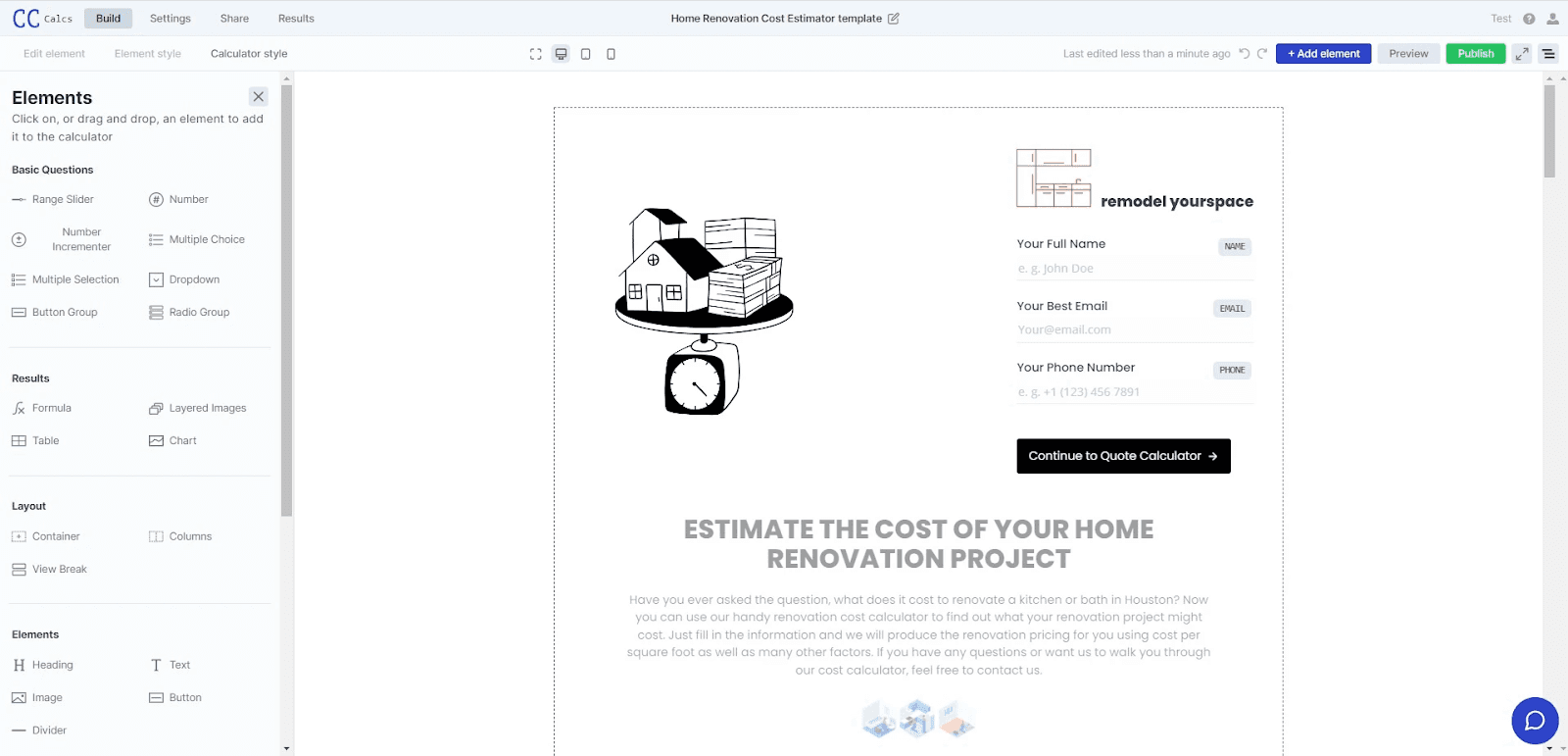
Convert is a powerful no-code builder for creating interactive content like forms, calculators, product configurators, quizzes, and more. It offers an intuitive drag-and-drop interface and an advanced calculation engine called FormulaScript.

Convert_ helps users create powerful custom forms and calculators, without coding skills.

A range of advanced features helps you build forms with more calculation power. You can create custom forms from scratch or use premade form templates.

Convert_ is ideal for small- to medium-sized businesses looking to automate their processes and boost sales.

Need to handle complex pricing models on your quoting or booking forms? Convert_ has the power and functionality for your use case.

The tool is highly customizable. You can get any look you’re after, so forms and calculators blend seamlessly with your branding.

Key features:

  • Web-based, drag-and-drop form builder

  • Serious calculation power

  • Advanced features to create powerful marketing tools

  • External database interaction


What is Jotform?

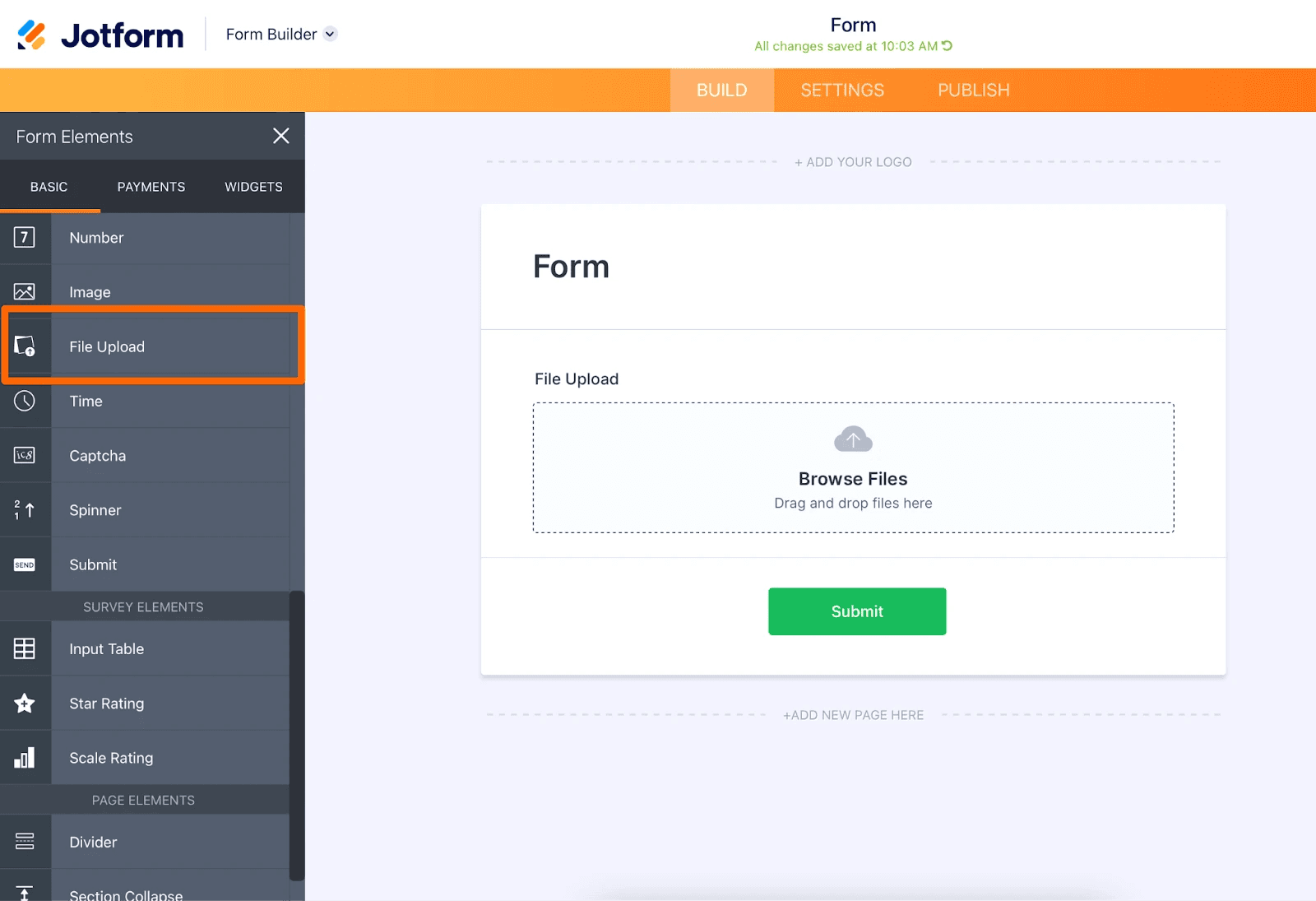
Jotform is an online platform for creating and managing forms. It offers a user-friendly interface and an extensive selection of customizable form templates, making it easy to build event registration, survey, and online payment forms.

The platform offers versatile drag-and-drop functionality. Users can select from a variety of form fields or "blocks" (such as text boxes, dropdown menus, radio buttons) and simply drag and drop them into their form.

Users can customize these blocks to suit their specific needs. Jotform also provides advanced form fields, conditional logic, and integration with popular third-party applications.

Key Features

  • Interactive form builder with a drag-and-drop interface

  • Library of over 10,000 templates

  • Variety of themes and color palettes

  • Numerous functionalities

  • Extensive range of integrations and widgets

6 Reasons Convert_ is a Powerful Jotform Alternative

We’ll run through each of the following reasons why Convert_ is a powerful Jotform alternative:

  1. Advanced calculations

  2. Conditional logic

  3. User experience

  4. Customer service

  5. Concierge service

  6. Pricing

1. Advanced Calculations

The advanced calculation power Convert_ offers makes it the main reason for choosing it as a Jotform alternative.

Jotform has a built-in calculation tool, but it is not as advanced or comprehensive as Convert_’s.

Jotorm lets you perform basic calculations within your forms, which is useful for simple order or quote forms.

But Convert_ is specifically designed with advanced calculation capabilities, making it a more powerful tool if your online forms or quoting tools need to deal with complex pricing structures.

Convert_ runs on a unique and powerful calculation engine called FormulaScript. FormulaScript uses Excel-like formulas to make powerful calculations.

Its high efficiency means it can handle even the most complex calculations without slowing down.

The advanced computing power of Convert_ makes the following possible:

Product configuration

A product configurator lets you configure a product with various elements (such as size, color, material) and get a custom price on one tool.

You can set up pricing rules for each attribute. This could involve fixed or percentage-based pricing.

Jotform does not have the capability to create product configurations, whereas Convert_ does.

Instant price quoting

Both form builders provide for instant quoting. But Convert_ can handle more complex pricing models.

Database connectivity

Connecting to an external database opens up a powerful range of automation functionality that can drive your business processes to the next level.

Here is some database functionality you will find in Convert_ and not in Jotform:

  • Data Collection and Storage: Each time a user fills out a form, the data entered can be automatically stored in a connected database. This facilitates easy data management and allows for future analysis and reporting.

  • Real-time Data Retrieval: Database connectivity allows for pulling data in real-time to populate form fields. For example, existing customer data can be fetched to autofill fields, saving the user's time.

  • Dynamic Form Updates: You can use data from your database to dynamically update elements of your form. For example, a drop-down list of products could be updated based on the current inventory data in your database.

  • Calculations: With a calculator, you can perform complex calculations using data from the database. This is particularly useful to create forms related to pricing, taxes, or any calculations that depend on stored data.

  • Data Validation: Database connectivity can be used to validate input data against stored values. For instance, checking if an entered email already exists in the database.

  • Conditional Logic: By integrating database connectivity, you can enhance conditional logic in your forms. For instance, showing specific questions based on data associated with a user.

  • Automating Processes: Database connectivity can help automate routine tasks. For example, triggering an email to a user once their data is stored in the database.

2. Conditional Logic

Conditional logic lets you create personalized and dynamic forms, surveys, quizzes, calculators, and more. The tool automatically adjusts the flow of questions based on user responses.

Essentially, it's an "if-then" rule that displays form questions or sections, depending on specific selections. This provides a tailored user experience based on the input received.

Both Jotform and Convert_ have no code conditional logic. But not all conditional logic is equal.

With Convert_, you can easily create multiple branches for almost endless question types. While Jotform has good conditional logic, the power and flexibility don’t match Convert_.

If you’re setting up instant price quoting, have complex pricing, want a product configurator, or have dynamic pricing, Convert_ offers the ability to do all this and more.


3. User Experience

Convert_ and Jotform both have intuitive user interfaces, but they cater to different needs.

Convert_'s user interface is straightforward and user-friendly. This lets you create complex calculators without any coding skills.

  • To harness the full power of Convert_, there is a steeper learning curve.

  • But it’s worth it for users who want to take advantage of the more powerful features and functionalities not available within Jotform.

On the other hand, Jotform provides a wide range of customization options. Its abundance of templates and widgets makes it easy to set up attractive and functional forms.

There are form templates for an extensive range of use cases, an excellent learning center with easy-to-follow video tutorials, and user guides for every scenario.

While Jotform’s building “blocks” simplify the user experience, they may hinder users who need more functionality and power to achieve their business goals.

4. Customer Service

Customer service options are different between the two platforms.

Jotform offers 24/7 message support, with response times usually hovering around 2 to 3 hours. Those with an enterprise account get a dedicated support team.

Often, you’ll find questions have already been answered in their extensive online FAQ area.

  • Jotform 4.4/5 on Capterra for their customer service.

  • Convert_ scores 4.8/5 for customer service on Capterra.

Convert_ has been praised by reviewers for its personalized, helpful service and quick response times. There’s a chat bubble on each webpage for support questions and a contact email address.

Customers love our ability to quickly implement feature requests. This allows them to update their tools and business processes as needed.

5. Concierge Service

Convert_ has a form builder service called 'Concierge Service.’ Starting from $250, Convert_ will create your calculator form based on best practices. Jotform doesn't provide this done-for-you service.

Convert_ help integrate the form or calculator on your web page and ensure the tool matches your branding and looks great. 

6. Pricing

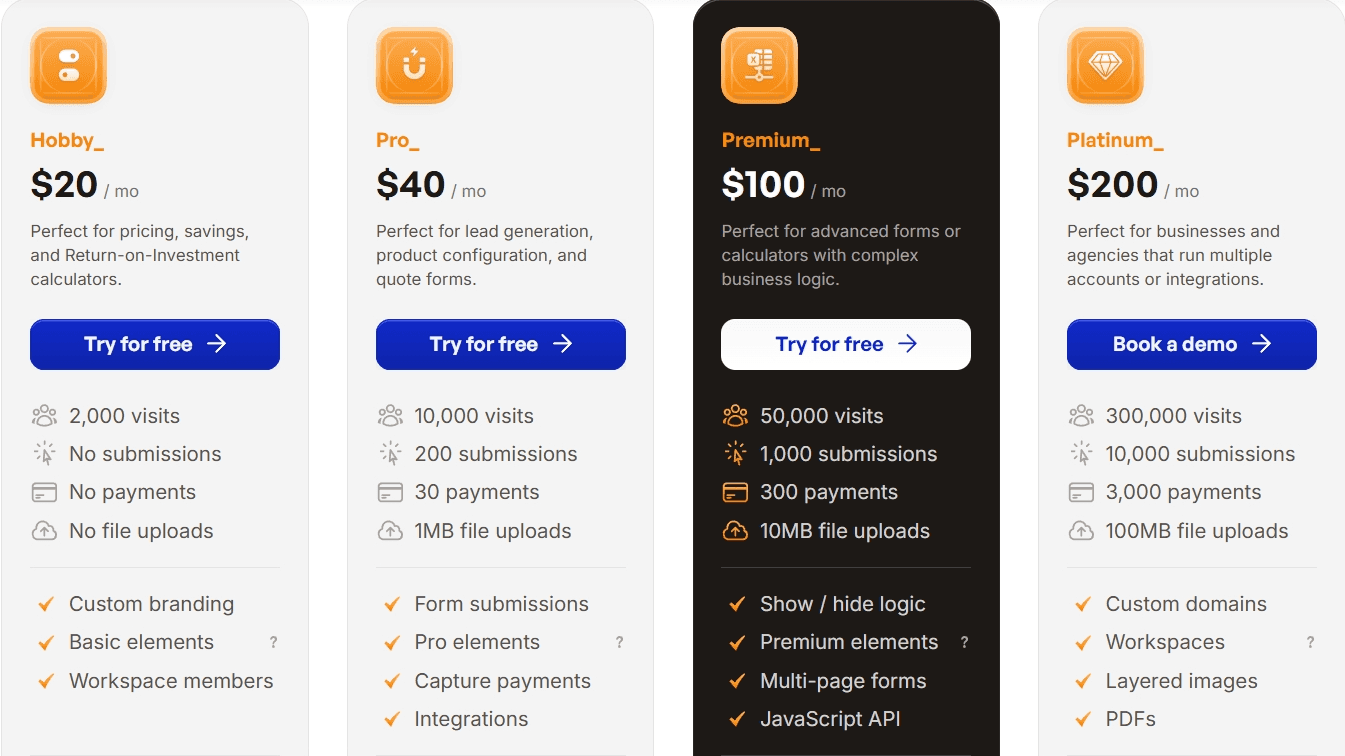
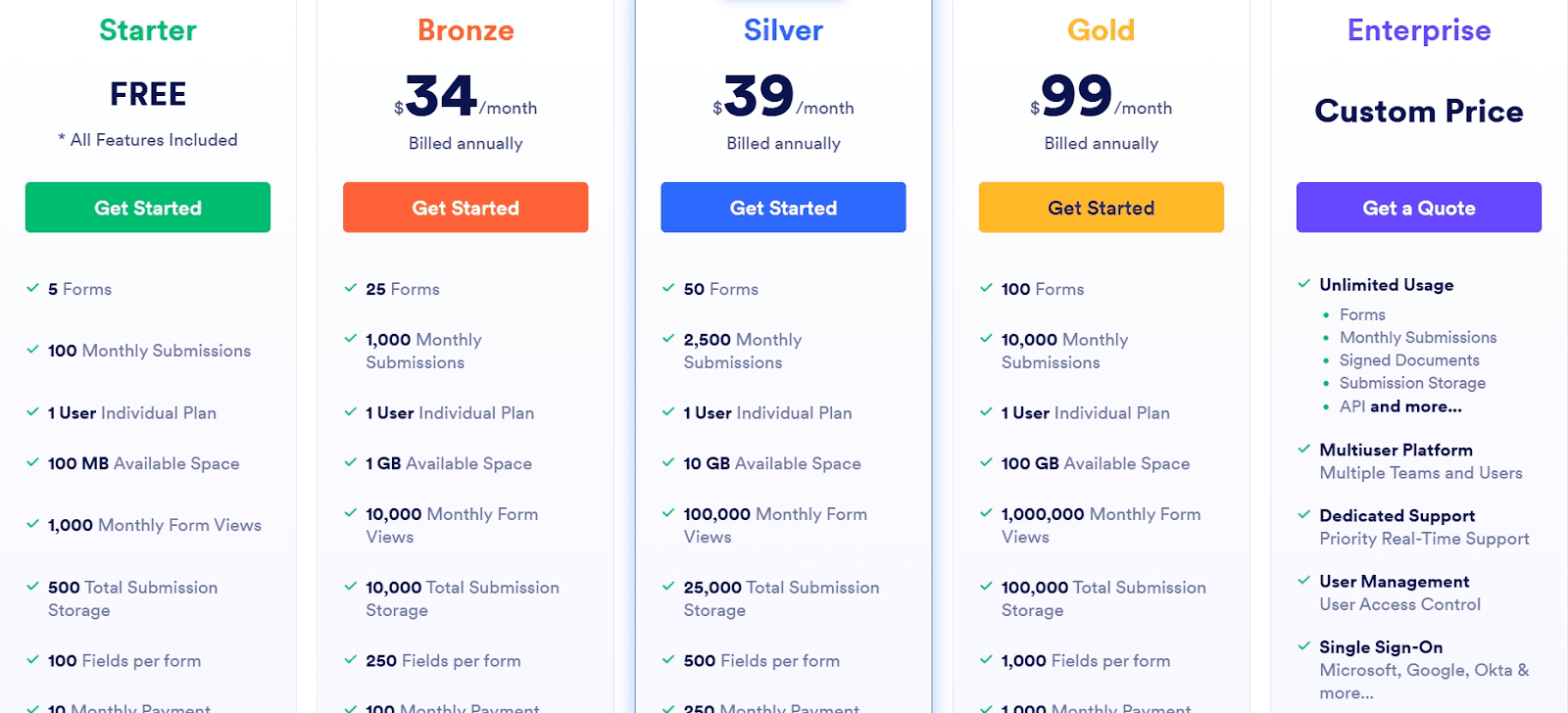
Let's compare the platforms for annual pricing.

With paid tiers, it's important to check the inclusions in each tier and consider your specific business needs.

Convert_ costs less to get started and both have similar pricing across subscription tiers. But Convert_’s highest tier (platinum) is $200/month while Jotform’s highest tier is custom pricing.

Convert_ pricing:

Jotform pricing:

Conclusion

Convert_ is a powerful Jotform alternative. But the form builder you choose will depend on the outcomes you want to achieve.

Maybe you need to create surveys, registration forms, simple pricing, collect online payments, and know you’ll never need the extra functionality. Then, Jotform is a good choice, given its ease of use and wide range of form templates.

If you want to truly automate workflows, manipulate data, create powerful forms, calculators, or product configurations, and provide instant price quotes for your products or services, then Convert_ is the powerful Jotform alternative that will take you there.

How Convert_ Helps You Create Interactive Tools

Convert_ is a powerful no-code tool that helps you build and customize interactive tools. Convert_ makes creating interactive content straightforward and offers:

  • Advanced powerful calculations

  • Embeds into any website

  • Excellent integrations

  • Highly customizable

  • Easy to use

  • Free plan

Our software does all the heavy lifting for you. Benefit from a user-friendly drag-and-drop builder to create powerful interactive tools - without coding skills.

Getting started is easy. Sign up for a free forever plan, choose a template, and customize it to suit your needs.


Jotform is a popular, intuitive form builder used by thousands of businesses. The product takes no coding knowledge and is easy to use.

But some use cases go well beyond its capabilities. This is where Convert_ is a great Jotform alternative.

Convert_ is a powerful no-code form builder capable of filling those gaps. It simplifies creating more advanced forms.

Each software has its own strengths. But we’ll cover 6 reasons why Convert_ is a powerful Jotform alternative.

Let’s dive in.

Key Takeaways: Convert_ vs. Jotform

  • Convert_ costs less to get started and is more affordable across subscription tiers.

  • Convert_ is built for complex calculations, allowing for advanced use cases like product configurators and complex pricing models.

  • Convert_ has more advanced conditional logic, supporting infinite branching and demand-based pricing structures.

  • Convert_ offers a "Concierge Service" starting at $250 where their team will build and integrate your tool for you.

Comparison Table for Convert_ and Jotfrom


Convert_

Jotform

Advanced Calculations

Powered by FormulaScript (Excel-like commands); handles complex pricing models, product configurations, and deep database connectivity.

Built-in calculation tool suitable for basic mathematical operations; lacks advanced configuration capabilities.

Conditional Logic

Highly flexible; supports multiple branches, infinite question types, and complex demand-based pricing structures.

Good no-code logic for standard use cases, but lacks the power and flexibility for highly complex branching.

User Experience

Intuitive drag-and-drop interface; steeper learning curve for advanced logic but offers powerful customization without code.

Very easy to use with drag-and-drop blocks; offers 10,000+ templates and a "Tables" feature for data management.

Customer Service

Rated 4.8/5 on Capterra; personalized support via chat and email with quick implementation of feature requests.

Rated 4.4/5 on Capterra; 24/7 message support (2-3 hour response time) and extensive self-help FAQs/videos.

Concierge Service

Offers a "Concierge Service" starting at $250 where they build the form/calculator for you.

Does not provide a "do it for you" build service.

Pricing

Generally lower (Hobby tier is <50% of Jotform Bronze); allows unlimited collaborators, forms, and fields.

Higher price point; restricts the number of forms, fields, and team members (requires Enterprise for teams).

What is Convert_?

Convert is a powerful no-code builder for creating interactive content like forms, calculators, product configurators, quizzes, and more. It offers an intuitive drag-and-drop interface and an advanced calculation engine called FormulaScript.

Convert_ helps users create powerful custom forms and calculators, without coding skills.

A range of advanced features helps you build forms with more calculation power. You can create custom forms from scratch or use premade form templates.

Convert_ is ideal for small- to medium-sized businesses looking to automate their processes and boost sales.

Need to handle complex pricing models on your quoting or booking forms? Convert_ has the power and functionality for your use case.

The tool is highly customizable. You can get any look you’re after, so forms and calculators blend seamlessly with your branding.

Key features:

  • Web-based, drag-and-drop form builder

  • Serious calculation power

  • Advanced features to create powerful marketing tools

  • External database interaction


What is Jotform?

Jotform is an online platform for creating and managing forms. It offers a user-friendly interface and an extensive selection of customizable form templates, making it easy to build event registration, survey, and online payment forms.

The platform offers versatile drag-and-drop functionality. Users can select from a variety of form fields or "blocks" (such as text boxes, dropdown menus, radio buttons) and simply drag and drop them into their form.

Users can customize these blocks to suit their specific needs. Jotform also provides advanced form fields, conditional logic, and integration with popular third-party applications.

Key Features

  • Interactive form builder with a drag-and-drop interface

  • Library of over 10,000 templates

  • Variety of themes and color palettes

  • Numerous functionalities

  • Extensive range of integrations and widgets


6 Reasons Convert_ is a Powerful Jotform Alternative

We’ll run through each of the following reasons why Convert_ is a powerful Jotform alternative:

  1. Advanced calculations

  2. Conditional logic

  3. User experience

  4. Customer service

  5. Concierge service

  6. Pricing

1. Advanced Calculations

The advanced calculation power Convert_ offers makes it the main reason for choosing it as a Jotform alternative.

Jotform has a built-in calculation tool, but it is not as advanced or comprehensive as Convert_’s.

Jotorm lets you perform basic calculations within your forms, which is useful for simple order or quote forms.

But Convert_ is specifically designed with advanced calculation capabilities, making it a more powerful tool if your online forms or quoting tools need to deal with complex pricing structures.

Convert_ runs on a unique and powerful calculation engine called FormulaScript. FormulaScript uses Excel-like formulas to make powerful calculations.

Its high efficiency means it can handle even the most complex calculations without slowing down.

The advanced computing power of Convert_ makes the following possible:

Product configuration

A product configurator lets you configure a product with various elements (such as size, color, material) and get a custom price on one tool.

You can set up pricing rules for each attribute. This could involve fixed or percentage-based pricing.

Jotform does not have the capability to create product configurations, whereas Convert_ does.

Instant price quoting

Both form builders provide for instant quoting. But Convert_ can handle more complex pricing models.

Database connectivity

Connecting to an external database opens up a powerful range of automation functionality that can drive your business processes to the next level.

Here is some database functionality you will find in Convert_ and not in Jotform:

  • Data Collection and Storage: Each time a user fills out a form, the data entered can be automatically stored in a connected database. This facilitates easy data management and allows for future analysis and reporting.

  • Real-time Data Retrieval: Database connectivity allows for pulling data in real-time to populate form fields. For example, existing customer data can be fetched to autofill fields, saving the user's time.

  • Dynamic Form Updates: You can use data from your database to dynamically update elements of your form. For example, a drop-down list of products could be updated based on the current inventory data in your database.

  • Calculations: With a calculator, you can perform complex calculations using data from the database. This is particularly useful to create forms related to pricing, taxes, or any calculations that depend on stored data.

  • Data Validation: Database connectivity can be used to validate input data against stored values. For instance, checking if an entered email already exists in the database.

  • Conditional Logic: By integrating database connectivity, you can enhance conditional logic in your forms. For instance, showing specific questions based on data associated with a user.

  • Automating Processes: Database connectivity can help automate routine tasks. For example, triggering an email to a user once their data is stored in the database.

2. Conditional Logic

Conditional logic lets you create personalized and dynamic forms, surveys, quizzes, calculators, and more. The tool automatically adjusts the flow of questions based on user responses.

Essentially, it's an "if-then" rule that displays form questions or sections, depending on specific selections. This provides a tailored user experience based on the input received.

Both Jotform and Convert_ have no code conditional logic. But not all conditional logic is equal.

With Convert_, you can easily create multiple branches for almost endless question types. While Jotform has good conditional logic, the power and flexibility don’t match Convert_.

If you’re setting up instant price quoting, have complex pricing, want a product configurator, or have dynamic pricing, Convert_ offers the ability to do all this and more.


3. User Experience

Convert_ and Jotform both have intuitive user interfaces, but they cater to different needs.

Convert_'s user interface is straightforward and user-friendly. This lets you create complex calculators without any coding skills.

  • To harness the full power of Convert_, there is a steeper learning curve.

  • But it’s worth it for users who want to take advantage of the more powerful features and functionalities not available within Jotform.

On the other hand, Jotform provides a wide range of customization options. Its abundance of templates and widgets makes it easy to set up attractive and functional forms.

There are form templates for an extensive range of use cases, an excellent learning center with easy-to-follow video tutorials, and user guides for every scenario.

While Jotform’s building “blocks” simplify the user experience, they may hinder users who need more functionality and power to achieve their business goals.

4. Customer Service

Customer service options are different between the two platforms.

Jotform offers 24/7 message support, with response times usually hovering around 2 to 3 hours. Those with an enterprise account get a dedicated support team.

Often, you’ll find questions have already been answered in their extensive online FAQ area.

  • Jotform 4.4/5 on Capterra for their customer service.

  • Convert_ scores 4.8/5 for customer service on Capterra.

Convert_ has been praised by reviewers for its personalized, helpful service and quick response times. There’s a chat bubble on each webpage for support questions and a contact email address.

Customers love our ability to quickly implement feature requests. This allows them to update their tools and business processes as needed.

5. Concierge Service

Convert_ has a form builder service called 'Concierge Service.’ Starting from $250, Convert_ will create your calculator form based on best practices. Jotform doesn't provide this done-for-you service.

Convert_ help integrate the form or calculator on your web page and ensure the tool matches your branding and looks great. 

6. Pricing

Let's compare the platforms for annual pricing.

With paid tiers, it's important to check the inclusions in each tier and consider your specific business needs.

Convert_ costs less to get started and both have similar pricing across subscription tiers. But Convert_’s highest tier (platinum) is $200/month while Jotform’s highest tier is custom pricing.

Convert_ pricing:


Jotform pricing:


Conclusion

Convert_ is a powerful Jotform alternative. But the form builder you choose will depend on the outcomes you want to achieve.

Maybe you need to create surveys, registration forms, simple pricing, collect online payments, and know you’ll never need the extra functionality. Then, Jotform is a good choice, given its ease of use and wide range of form templates.

If you want to truly automate workflows, manipulate data, create powerful forms, calculators, or product configurations, and provide instant price quotes for your products or services, then Convert_ is the powerful Jotform alternative that will take you there.

How Convert_ Helps You Create Interactive Tools

Convert_ is a powerful no-code tool that helps you build and customize interactive tools. Convert_ makes creating interactive content straightforward and offers:

  • Advanced powerful calculations

  • Embeds into any website

  • Excellent integrations

  • Highly customizable

  • Easy to use

  • Free plan

Our software does all the heavy lifting for you. Benefit from a user-friendly drag-and-drop builder to create powerful interactive tools - without coding skills.

Getting started is easy. Sign up for a free forever plan, choose a template, and customize it to suit your needs.


Jotform is a popular, intuitive form builder used by thousands of businesses. The product takes no coding knowledge and is easy to use.

But some use cases go well beyond its capabilities. This is where Convert_ is a great Jotform alternative.

Convert_ is a powerful no-code form builder capable of filling those gaps. It simplifies creating more advanced forms.

Each software has its own strengths. But we’ll cover 6 reasons why Convert_ is a powerful Jotform alternative.

Let’s dive in.

Key Takeaways: Convert_ vs. Jotform

  • Convert_ costs less to get started and is more affordable across subscription tiers.

  • Convert_ is built for complex calculations, allowing for advanced use cases like product configurators and complex pricing models.

  • Convert_ has more advanced conditional logic, supporting infinite branching and demand-based pricing structures.

  • Convert_ offers a "Concierge Service" starting at $250 where their team will build and integrate your tool for you.

Comparison Table for Convert_ and Jotfrom


Convert_

Jotform

Advanced Calculations

Powered by FormulaScript (Excel-like commands); handles complex pricing models, product configurations, and deep database connectivity.

Built-in calculation tool suitable for basic mathematical operations; lacks advanced configuration capabilities.

Conditional Logic

Highly flexible; supports multiple branches, infinite question types, and complex demand-based pricing structures.

Good no-code logic for standard use cases, but lacks the power and flexibility for highly complex branching.

User Experience

Intuitive drag-and-drop interface; steeper learning curve for advanced logic but offers powerful customization without code.

Very easy to use with drag-and-drop blocks; offers 10,000+ templates and a "Tables" feature for data management.

Customer Service

Rated 4.8/5 on Capterra; personalized support via chat and email with quick implementation of feature requests.

Rated 4.4/5 on Capterra; 24/7 message support (2-3 hour response time) and extensive self-help FAQs/videos.

Concierge Service

Offers a "Concierge Service" starting at $250 where they build the form/calculator for you.

Does not provide a "do it for you" build service.

Pricing

Generally lower (Hobby tier is <50% of Jotform Bronze); allows unlimited collaborators, forms, and fields.

Higher price point; restricts the number of forms, fields, and team members (requires Enterprise for teams).

What is Convert_?

Convert is a powerful no-code builder for creating interactive content like forms, calculators, product configurators, quizzes, and more. It offers an intuitive drag-and-drop interface and an advanced calculation engine called FormulaScript.

Convert_ helps users create powerful custom forms and calculators, without coding skills.

A range of advanced features helps you build forms with more calculation power. You can create custom forms from scratch or use premade form templates.

Convert_ is ideal for small- to medium-sized businesses looking to automate their processes and boost sales.

Need to handle complex pricing models on your quoting or booking forms? Convert_ has the power and functionality for your use case.

The tool is highly customizable. You can get any look you’re after, so forms and calculators blend seamlessly with your branding.

Key features:

  • Web-based, drag-and-drop form builder

  • Serious calculation power

  • Advanced features to create powerful marketing tools

  • External database interaction


What is Jotform?

Jotform is an online platform for creating and managing forms. It offers a user-friendly interface and an extensive selection of customizable form templates, making it easy to build event registration, survey, and online payment forms.

The platform offers versatile drag-and-drop functionality. Users can select from a variety of form fields or "blocks" (such as text boxes, dropdown menus, radio buttons) and simply drag and drop them into their form.

Users can customize these blocks to suit their specific needs. Jotform also provides advanced form fields, conditional logic, and integration with popular third-party applications.

Key Features

  • Interactive form builder with a drag-and-drop interface

  • Library of over 10,000 templates

  • Variety of themes and color palettes

  • Numerous functionalities

  • Extensive range of integrations and widgets


6 Reasons Convert_ is a Powerful Jotform Alternative

We’ll run through each of the following reasons why Convert_ is a powerful Jotform alternative:

  1. Advanced calculations

  2. Conditional logic

  3. User experience

  4. Customer service

  5. Concierge service

  6. Pricing

1. Advanced Calculations

The advanced calculation power Convert_ offers makes it the main reason for choosing it as a Jotform alternative.

Jotform has a built-in calculation tool, but it is not as advanced or comprehensive as Convert_’s.

Jotorm lets you perform basic calculations within your forms, which is useful for simple order or quote forms.

But Convert_ is specifically designed with advanced calculation capabilities, making it a more powerful tool if your online forms or quoting tools need to deal with complex pricing structures.

Convert_ runs on a unique and powerful calculation engine called FormulaScript. FormulaScript uses Excel-like formulas to make powerful calculations.

Its high efficiency means it can handle even the most complex calculations without slowing down.

The advanced computing power of Convert_ makes the following possible:

Product configuration

A product configurator lets you configure a product with various elements (such as size, color, material) and get a custom price on one tool.

You can set up pricing rules for each attribute. This could involve fixed or percentage-based pricing.

Jotform does not have the capability to create product configurations, whereas Convert_ does.

Instant price quoting

Both form builders provide for instant quoting. But Convert_ can handle more complex pricing models.

Database connectivity

Connecting to an external database opens up a powerful range of automation functionality that can drive your business processes to the next level.

Here is some database functionality you will find in Convert_ and not in Jotform:

  • Data Collection and Storage: Each time a user fills out a form, the data entered can be automatically stored in a connected database. This facilitates easy data management and allows for future analysis and reporting.

  • Real-time Data Retrieval: Database connectivity allows for pulling data in real-time to populate form fields. For example, existing customer data can be fetched to autofill fields, saving the user's time.

  • Dynamic Form Updates: You can use data from your database to dynamically update elements of your form. For example, a drop-down list of products could be updated based on the current inventory data in your database.

  • Calculations: With a calculator, you can perform complex calculations using data from the database. This is particularly useful to create forms related to pricing, taxes, or any calculations that depend on stored data.

  • Data Validation: Database connectivity can be used to validate input data against stored values. For instance, checking if an entered email already exists in the database.

  • Conditional Logic: By integrating database connectivity, you can enhance conditional logic in your forms. For instance, showing specific questions based on data associated with a user.

  • Automating Processes: Database connectivity can help automate routine tasks. For example, triggering an email to a user once their data is stored in the database.

2. Conditional Logic

Conditional logic lets you create personalized and dynamic forms, surveys, quizzes, calculators, and more. The tool automatically adjusts the flow of questions based on user responses.

Essentially, it's an "if-then" rule that displays form questions or sections, depending on specific selections. This provides a tailored user experience based on the input received.

Both Jotform and Convert_ have no code conditional logic. But not all conditional logic is equal.

With Convert_, you can easily create multiple branches for almost endless question types. While Jotform has good conditional logic, the power and flexibility don’t match Convert_.

If you’re setting up instant price quoting, have complex pricing, want a product configurator, or have dynamic pricing, Convert_ offers the ability to do all this and more.


3. User Experience

Convert_ and Jotform both have intuitive user interfaces, but they cater to different needs.

Convert_'s user interface is straightforward and user-friendly. This lets you create complex calculators without any coding skills.

  • To harness the full power of Convert_, there is a steeper learning curve.

  • But it’s worth it for users who want to take advantage of the more powerful features and functionalities not available within Jotform.

On the other hand, Jotform provides a wide range of customization options. Its abundance of templates and widgets makes it easy to set up attractive and functional forms.

There are form templates for an extensive range of use cases, an excellent learning center with easy-to-follow video tutorials, and user guides for every scenario.

While Jotform’s building “blocks” simplify the user experience, they may hinder users who need more functionality and power to achieve their business goals.

4. Customer Service

Customer service options are different between the two platforms.

Jotform offers 24/7 message support, with response times usually hovering around 2 to 3 hours. Those with an enterprise account get a dedicated support team.

Often, you’ll find questions have already been answered in their extensive online FAQ area.

  • Jotform 4.4/5 on Capterra for their customer service.

  • Convert_ scores 4.8/5 for customer service on Capterra.

Convert_ has been praised by reviewers for its personalized, helpful service and quick response times. There’s a chat bubble on each webpage for support questions and a contact email address.

Customers love our ability to quickly implement feature requests. This allows them to update their tools and business processes as needed.

5. Concierge Service

Convert_ has a form builder service called 'Concierge Service.’ Starting from $250, Convert_ will create your calculator form based on best practices. Jotform doesn't provide this done-for-you service.

Convert_ help integrate the form or calculator on your web page and ensure the tool matches your branding and looks great. 

6. Pricing

Let's compare the platforms for annual pricing.

With paid tiers, it's important to check the inclusions in each tier and consider your specific business needs.

Convert_ costs less to get started and both have similar pricing across subscription tiers. But Convert_’s highest tier (platinum) is $200/month while Jotform’s highest tier is custom pricing.

Convert_ pricing:


Jotform pricing:


Conclusion

Convert_ is a powerful Jotform alternative. But the form builder you choose will depend on the outcomes you want to achieve.

Maybe you need to create surveys, registration forms, simple pricing, collect online payments, and know you’ll never need the extra functionality. Then, Jotform is a good choice, given its ease of use and wide range of form templates.

If you want to truly automate workflows, manipulate data, create powerful forms, calculators, or product configurations, and provide instant price quotes for your products or services, then Convert_ is the powerful Jotform alternative that will take you there.

How Convert_ Helps You Create Interactive Tools

Convert_ is a powerful no-code tool that helps you build and customize interactive tools. Convert_ makes creating interactive content straightforward and offers:

  • Advanced powerful calculations

  • Embeds into any website

  • Excellent integrations

  • Highly customizable

  • Easy to use

  • Free plan

Our software does all the heavy lifting for you. Benefit from a user-friendly drag-and-drop builder to create powerful interactive tools - without coding skills.

Getting started is easy. Sign up for a free forever plan, choose a template, and customize it to suit your needs.


FAQ

Read our answers to frequently asked questions below.

What makes Convert_ a more powerful alternative to Jotform for advanced calculations and complex pricing models?

Convert_ is built for advanced calculations through its FormulaScript engine, which handles complex pricing models, product configurations, and database-driven logic without slowing down. Jotform can perform basic calculations, but it lacks the depth needed for dynamic pricing, multi-attribute configurators, or heavy conditional logic.

Convert_ also supports external database connectivity, enabling real-time data retrieval, validation and dynamic updates that Jotform cannot match. This makes Convert_ far more suitable for quoting tools, booking systems, custom product builders and any workflow requiring fast, powerful calculations.

What makes Convert_ a more powerful alternative to Jotform for advanced calculations and complex pricing models?

Convert_ is built for advanced calculations through its FormulaScript engine, which handles complex pricing models, product configurations, and database-driven logic without slowing down. Jotform can perform basic calculations, but it lacks the depth needed for dynamic pricing, multi-attribute configurators, or heavy conditional logic.

Convert_ also supports external database connectivity, enabling real-time data retrieval, validation and dynamic updates that Jotform cannot match. This makes Convert_ far more suitable for quoting tools, booking systems, custom product builders and any workflow requiring fast, powerful calculations.

What makes Convert_ a more powerful alternative to Jotform for advanced calculations and complex pricing models?

Convert_ is built for advanced calculations through its FormulaScript engine, which handles complex pricing models, product configurations, and database-driven logic without slowing down. Jotform can perform basic calculations, but it lacks the depth needed for dynamic pricing, multi-attribute configurators, or heavy conditional logic.

Convert_ also supports external database connectivity, enabling real-time data retrieval, validation and dynamic updates that Jotform cannot match. This makes Convert_ far more suitable for quoting tools, booking systems, custom product builders and any workflow requiring fast, powerful calculations.

How does the conditional logic in Convert_ differ from Jotform’s capabilities?

Convert_ offers highly flexible conditional logic that supports multiple branches, dynamic pricing rules, infinite question paths and complex decision flows. This level of customization allows you to create advanced quoting tools, product configurators and deeply personalized user journeys.

Jotform also provides no-code conditional logic, but it is designed for standard use cases and cannot match the depth or scalability needed for complex branching or dynamic pricing models. As a result, Convert_ is better suited for teams that need powerful logic structures beyond simple if-then interactions.

How does the conditional logic in Convert_ differ from Jotform’s capabilities?

Convert_ offers highly flexible conditional logic that supports multiple branches, dynamic pricing rules, infinite question paths and complex decision flows. This level of customization allows you to create advanced quoting tools, product configurators and deeply personalized user journeys.

Jotform also provides no-code conditional logic, but it is designed for standard use cases and cannot match the depth or scalability needed for complex branching or dynamic pricing models. As a result, Convert_ is better suited for teams that need powerful logic structures beyond simple if-then interactions.

How does the conditional logic in Convert_ differ from Jotform’s capabilities?

Convert_ offers highly flexible conditional logic that supports multiple branches, dynamic pricing rules, infinite question paths and complex decision flows. This level of customization allows you to create advanced quoting tools, product configurators and deeply personalized user journeys.

Jotform also provides no-code conditional logic, but it is designed for standard use cases and cannot match the depth or scalability needed for complex branching or dynamic pricing models. As a result, Convert_ is better suited for teams that need powerful logic structures beyond simple if-then interactions.

How do Convert_ and Jotform compare in user experience and ease of building advanced forms or calculators?

Both platforms are intuitive, but they serve different needs. Jotform is extremely easy to use thanks to its drag-and-drop blocks and large library of templates, making it ideal for simple forms.

Convert_ is also user-friendly but offers far more power under the hood, enabling advanced calculators, dynamic pricing tools and complex workflows. This added capability introduces a slightly steeper learning curve, but it allows users to build features that Jotform cannot support. For advanced functionality and automation, Convert_ delivers greater flexibility and control.

How do Convert_ and Jotform compare in user experience and ease of building advanced forms or calculators?

Both platforms are intuitive, but they serve different needs. Jotform is extremely easy to use thanks to its drag-and-drop blocks and large library of templates, making it ideal for simple forms.

Convert_ is also user-friendly but offers far more power under the hood, enabling advanced calculators, dynamic pricing tools and complex workflows. This added capability introduces a slightly steeper learning curve, but it allows users to build features that Jotform cannot support. For advanced functionality and automation, Convert_ delivers greater flexibility and control.

How do Convert_ and Jotform compare in user experience and ease of building advanced forms or calculators?

Both platforms are intuitive, but they serve different needs. Jotform is extremely easy to use thanks to its drag-and-drop blocks and large library of templates, making it ideal for simple forms.

Convert_ is also user-friendly but offers far more power under the hood, enabling advanced calculators, dynamic pricing tools and complex workflows. This added capability introduces a slightly steeper learning curve, but it allows users to build features that Jotform cannot support. For advanced functionality and automation, Convert_ delivers greater flexibility and control.

How does customer service differ between Convert_ and Jotform, and what support options does each platform offer?

Convert_ offers highly rated customer service (4.8/5), with responsive support via email and a track record of quickly implementing feature requests. They also offer a concierge service (from US$250) to build and integrate tools on your behalf.

Jotform offers 24/7 message support, with typical response times of two to three hours, a comprehensive FAQ and video-tutorial library, and higher-tier users get access to dedicated support teams.

How does customer service differ between Convert_ and Jotform, and what support options does each platform offer?

Convert_ offers highly rated customer service (4.8/5), with responsive support via email and a track record of quickly implementing feature requests. They also offer a concierge service (from US$250) to build and integrate tools on your behalf.

Jotform offers 24/7 message support, with typical response times of two to three hours, a comprehensive FAQ and video-tutorial library, and higher-tier users get access to dedicated support teams.

How does customer service differ between Convert_ and Jotform, and what support options does each platform offer?

Convert_ offers highly rated customer service (4.8/5), with responsive support via email and a track record of quickly implementing feature requests. They also offer a concierge service (from US$250) to build and integrate tools on your behalf.

Jotform offers 24/7 message support, with typical response times of two to three hours, a comprehensive FAQ and video-tutorial library, and higher-tier users get access to dedicated support teams.

Share this post

Published: January 9, 2026

More leads in less time_

Stop wasting time on manual quotes. Automate your lead funnel today.

Create powerful on brand calculators, lead generation forms and apps that automate your marketing and sales processes

Start with a template

Find inspiration or customize an outstanding template, complete with functional formulas and flows to help you get started.

Let us build for you

We can build your calculator, and afterwards you can always make changes yourself. Our service starts at just $250.

More leads in less time_

Stop wasting time on manual quotes. Automate your lead funnel today.

Create powerful on brand calculators, lead generation forms and apps that automate your marketing and sales processes

Start with a template

Find inspiration or customize an outstanding template, complete with functional formulas and flows to help you get started.

Let us build for you

We can build your calculator, and afterwards you can always make changes yourself. Our service starts at just $250.