
All categories


Calculators are an amazing marketing tool for engaging audiences, collecting leads, and boosting conversions.
Interactive content, such as calculators, increase engagement by over 50% and 2x conversion rates.
The power of calculators for marketing is established, but you may not know the best calculator builder for your needs. So, we’re going to compare two popular no-code calculator builders, Convert_ and Calconic.
Each platform simplifies creating interactive calculators and offers similar benefits. But let’s go head-to-head into the features to discover which one is best for you.
Key Takeaways: Convert_ vs. Involve.me
Convert_ is best for creating powerful, complex calculators with large datasets.
Convert_ has a better free plan, giving you access to all premium features up to 100 monthly visits.
Convert_ lets you build more tools, covering calculators plus product configurators, forms, quizzes, surveys, assessments.
Convert_ has better integration capabilities, with more native integration options.
Convert_ offers stronger analytics event tracking and integration with independent analytics tools.
Comparison Table for Convert_ and Calconic
XyqTMP7rtRg4bZLds
What is Convert_?
Convert_ is a powerful no-code interactive content builder with a drag-and-drop interface. The tool helps you:
Increase engagement
Raise brand awareness
Gather and qualify leads
Boost conversions
Create website calculators, forms, quizzes, surveys, landing pages, apps, and more.
The platform simplifies creating interactive content, and a range of templates gives you a headstart when building calculators, getting you to the finish line faster.
The software has the most powerful calculation abilities in this space, meaning it excels at creating dynamic calculators. This calculator builder can handle even the largest datasets without slowing down.
7sLE6jKKty4CYMAXX
JbGPrP2TNcCySZRWL
FormulaScript, the platform’s newest calculator engine, is the driver for this power. Expect 100x more efficiency for maintaining calculation speed even with larger and more complex calculators.
Some calculator builder software can’t handle larger calculations well. They’re less efficient at running formulas - which makes the calculator tool slower for your end users.
Convert_ has solved this problem with FormulaScript. You can create large, complex calculators without affecting the performance.
Combining this with the intuitive interface lets you easily create complex calculators that are lightning fast and still simple to navigate for your end user.
What is Calconic?

Calconic is a no-code calculator builder. The software helps you engage audiences, collect leads, and increase conversions.
Whereas Convert_ helps you create calculators, product configurators, forms, quizzes, surveys, assessments, and more, Calconic is solely for creating calculators.
Calconic also makes building calculators easier with a range of templates. These relate to industries like construction, energy, and financial services.
How Do Convert_ and Calconic Features Compare?
We’ll do a direct comparison for Convert_ vs. Calconic for each of these features:
Free plan
Calculations
User experience
Product Configuration
Customization
Integrations
Analytics
Pricing
Free Plan

Does Convert_ offer a free plan?
Yes, Convert_ offers a free plan. Our free forever plan lets you try all of the premium features until your tool gets 100 visits per month.
Other platforms offer a 14-day trial, but we understand that 14 days isn’t always enough time to test out software. That’s why we offer the free forever plan that gives you access to all of the platinum features.
Now, when you sign up for our free plan, get distracted with other life admin, and completely forget about the software for a while, you can still login and test every feature without the trial expiring.
This gives you the time to decide which features are right for you and your needs. Then, you can upgrade your plan as you scale.
Does Calconic offer a free plan?
Yes, Calconic offers a basic free plan without its advanced features. Calconic offers a 14-day free trial where you can access all premium features.
Once the trial expires, they move you to the free plan which has the most basic features. Then, you can’t access any of the advanced features until you upgrade to a paid plan.
Calculations
Can Convert_ handle powerful calculations?
Yes, Convert_ can handle powerful calculations. Our platform is the most powerful and dynamic no-code calculator builder on the market.
Convert_ has a unique calculation engine called FormulaScript. This gives you the calculation efficiency you need for creating complex calculators - without the calculator slowing down.
For builders without the efficiency, calculation speed drops off dramatically in larger, more complex calculators (which torpedos user experience). Many calculator builders on the market have this problem.
But we’ve solved this issue. Because FormulaScript makes our calculators 100x more efficient and gives you more freedom to adjust and add new formulas without affecting speed.
Our dynamic formulas and powerful conditional logic help you build even the most complex calculators.
5t4QBSRHk7vEtSkHr
Can Calconic handle powerful calculations?
Calconic can’t handle powerful calculations to the same degree as Convert_. Although Calconic also uses formulas and conditional logic to perform calculations, there’s one huge difference between Convert_ and Calconic:
FormulaScript
The difference in calculation efficiency between Convert_ and Calconic is significant. This makes Calconic less effective for building large, complex calculators.
Calconic can’t deal with the added calculations in the same way. So, the end calculator will be slower for users.
User Experience
Both Convert_ and Calconic are no-code builders with drag-and-drop functions. Creating calculators is easy, and you don’t need to know code or hire expensive developers.
Add elements like titles, text, and images before arranging them how you like with the drag-and-drop function. These elements are easy to customize with the colors and fonts you want.
For some users, the formulas in both platforms may take some getting used to. But it shouldn’t take too long to get on top of them, especially if you’re familiar with Excel formulas.
The formulas are the hardest part of creating a calculator, while everything else is straightforward. Each platform also has templates to choose from if you want to make it even easier.
Simply customize an existing Convert_ template to meet your needs and embed it into your website.
Product Configuration
Does Convert_ have product configuration capabilities?
Yes, Convert_ has product configuration capabilities. Convert_ is the only solution between the two if your business requires a product configurator with real-time pricing adjustments.
The layered images feature gives users a visual representation of your products. When they make different selections, the images update to display how each option looks.
The dynamic pricing means users get instant pricing updates after each selection. So, they see how the product looks and get the final price with a product configurator.
Convert_: Advanced Product Configuration with Dynamic Pricing
Real-time pricing updates – Prices adjust instantly based on user selections.
Handles complex configurations – Supports multi-step forms, layered images, and conditional logic.
Can display visual product changes with layered images – Users can see how different selections impact their final product.
Ideal for businesses selling customized products & services – Used in industries like manufacturing, construction, home improvement, and custom eCommerce.
Supports tiered & conditional pricing – Users can apply rules (e.g., volume discounts, material surcharges).
Does Calconic have product configuration capabilities?
Calconic doesn’t have product configuration capabilities. You can create a budget calculator or mortgage calculator, but you won’t be able to build a product configurator.
Customization
You have the option to customize calculators with both platforms. The out-of-the-box customization capabilities of Convert_ and Calconic simplify styling your tools.
Change colors, fonts, and backgrounds. Customize individual elements and add images to your calculators in a few clicks with each.
Convert_ and Calconic also give you full control of custom styling with CSS. Although you need to be familiar with this style sheet language to incorporate it into your designs, the option means you can make your calculators even more visually appealing.
In the demo below, we show how you can use custom CSS. In the first example, we show how we can style a multiple choice component with multiple lines of CSS. In the second example, we add a light purple outline on our text inputs with CSS.
Integrations
Convert_ has better capabilities for integrating with other software. While Calconic only has two native integrations (Google Sheets and Zapier), Convert_ natively integrates with:
HubSpot
Zapier
Google Sheets
Mailchimp
Stripe
Google Maps
Snipcart
Trello
Text Message
Both also integrate with 1000+ apps through Zapier, while Convert_ connects with whatever tool or service you’re using through WebHooks.
Analytics
Convert_ performs better when it comes to analytics. We distinguish the following event types:
StartSession: This event is triggered when the calculator is loaded
StopSession: This event is triggered when the calculator gets removed from the page
Interaction: This event is triggered when a user interacts with a calculator (e.g., slides a slider or inputs a number)
VisibilityChange: This event is triggered when the calculator scrolls in and out of view
Submit: This event is triggered when a calculator form gets submitted
Checkout: This event is triggered when a calculator form gets submitted with a checkout
Redirect: This event is triggered when a link button is clicked on the calculator
Calconic also lets you track events on the dashboard. But this is limited to 4 events: Impressions, views, interactions, and submissions.
Convert_ lets you integrate with independent analytics tools for even more insights. You can track events with:
Google Analytics
Google Tag Manager
Amplitude
Mixpanel
Facebook Pixel
Integrating with these analytics tools provides a broader scope for gathering and tracking insights related to your calculator usage.
Pricing
At first glance, it looks like Convert_ costs significantly more than Calonic. But this changes when you take into account what you can do with each platform and the overall value you get.
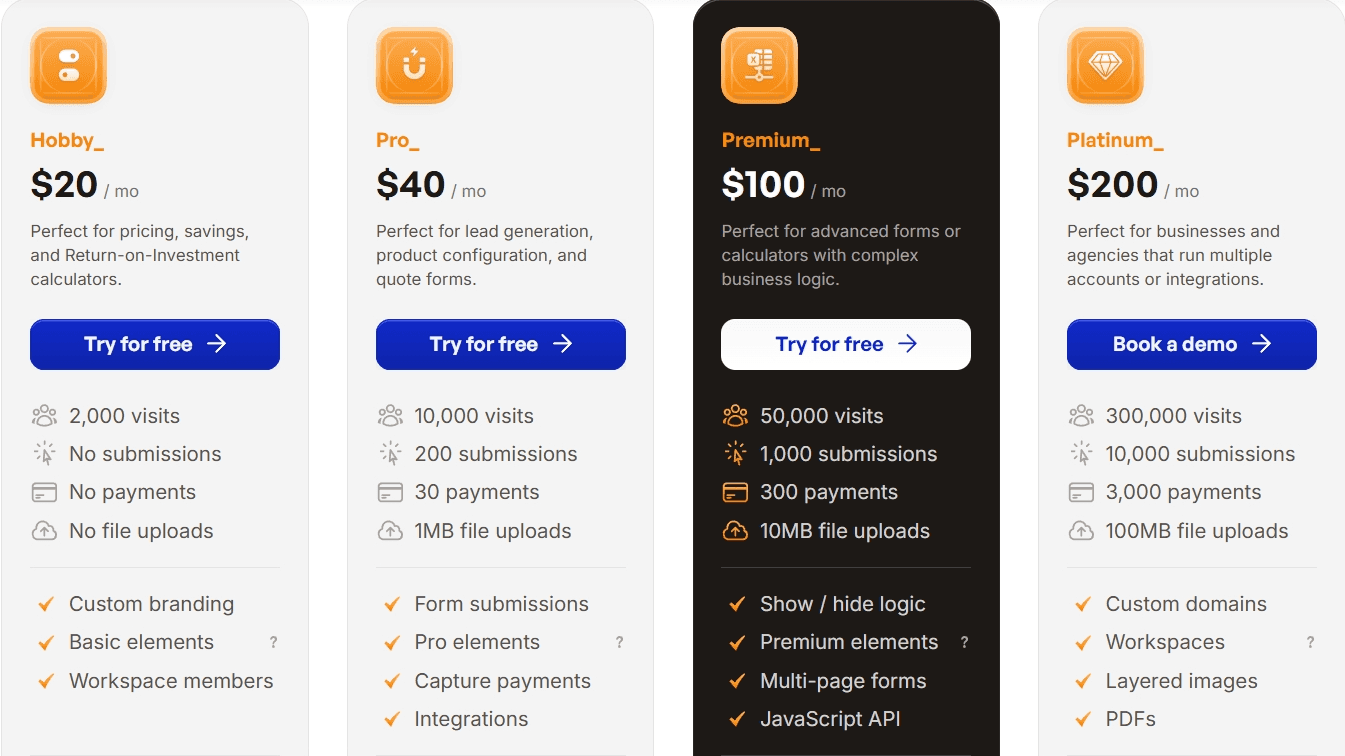
For instance, let’s compare the top plans, the Convert_ Platinum Plan ($200/month) and the Calconic Bold Plan ($44/month). Please note that these prices are for paying annually.
The Platinum Plan gives you 300,000 monthly visits, while Calconic’s Bold Plan offers 75,000. With the price difference, this looks like Calconic provides better value, but when you dig a little deeper, the picture begins to change.
Because Convert_ allows you to create calculators, product configurators, quizzes, surveys, forms, and tests. With Calconic, you’re limited to only calculators and forms. And Convert_ has significantly more inbuilt features like layered images and PDF quotes.
Additionally, every Convert_ plans offers you unlimited calculators. But only Calconic’s top plan offers this, with the others offering 5, 10, and 20 calculators respectively.
Customer Ratings
Ratings show that customers are happy with both platforms, although Convert_ has a better Capterra rating. Convert_ scores 4.8/5 on Capterra, with Calconic scoring a 4.5/5 rating.
Which Calculator Builder is Best: Convert_ or Calconic?
Convert_ is the best calculator builder when compared to Calconic. Overall, Convert_ offers you:
Increased calculation power
Better integration options
More data for insights
Better value
Convert_ is the most powerful calculator builder on the market. If you need to create larger, more complex calculators, our software is best equipped to handle this efficiently.
FormulaScript provides the power under the hood to handle more complex calculations. The calculation efficiency means calculators won’t slow down and affect user experience.
We have more native integration options, letting you integrate with other software more seamlessly. Our analytics capabilities are much better than Calconic’s, helping you gather more insights on users to further develop your marketing strategies.
How Convert_ Helps You Create Interactive Calculators
Convert_ is a powerful no-code tool that helps you build and customize interactive calculators. You can create calculators to:
Spread brand awareness
Increase engagement
Build an audience
Generate leads
Boost sales
We make creating interactive calculators straightforward, while offering other advantages:
Most powerful calculations
Embeds into any website
Excellent integrations
Highly customizable
Easy to use
Free plan
Our software does all the heavy lifting for you. Benefit from a user-friendly, drag-and-drop builder for creating powerful interactive calculators - without coding skills.
Getting started is easy. Sign up for a free forever plan, choose a template, and customize it to suit your needs.
Calculators are an amazing marketing tool for engaging audiences, collecting leads, and boosting conversions.
Interactive content, such as calculators, increase engagement by over 50% and 2x conversion rates.
The power of calculators for marketing is established, but you may not know the best calculator builder for your needs. So, we’re going to compare two popular no-code calculator builders, Convert_ and Calconic.
Each platform simplifies creating interactive calculators and offers similar benefits. But let’s go head-to-head into the features to discover which one is best for you.
Key Takeaways: Convert_ vs. Involve.me
Convert_ is best for creating powerful, complex calculators with large datasets.
Convert_ has a better free plan, giving you access to all premium features up to 100 monthly visits.
Convert_ lets you build more tools, covering calculators plus product configurators, forms, quizzes, surveys, assessments.
Convert_ has better integration capabilities, with more native integration options.
Convert_ offers stronger analytics event tracking and integration with independent analytics tools.
Comparison Table for Convert_ and Calconic
XyqTMP7rtRg4bZLds
What is Convert_?
Convert_ is a powerful no-code interactive content builder with a drag-and-drop interface. The tool helps you:
Increase engagement
Raise brand awareness
Gather and qualify leads
Boost conversions
Create website calculators, forms, quizzes, surveys, landing pages, apps, and more.
The platform simplifies creating interactive content, and a range of templates gives you a headstart when building calculators, getting you to the finish line faster.
The software has the most powerful calculation abilities in this space, meaning it excels at creating dynamic calculators. This calculator builder can handle even the largest datasets without slowing down.
7sLE6jKKty4CYMAXX
JbGPrP2TNcCySZRWL
FormulaScript, the platform’s newest calculator engine, is the driver for this power. Expect 100x more efficiency for maintaining calculation speed even with larger and more complex calculators.
Some calculator builder software can’t handle larger calculations well. They’re less efficient at running formulas - which makes the calculator tool slower for your end users.
Convert_ has solved this problem with FormulaScript. You can create large, complex calculators without affecting the performance.
Combining this with the intuitive interface lets you easily create complex calculators that are lightning fast and still simple to navigate for your end user.
What is Calconic?
Calconic is a no-code calculator builder. The software helps you engage audiences, collect leads, and increase conversions.
Whereas Convert_ helps you create calculators, product configurators, forms, quizzes, surveys, assessments, and more, Calconic is solely for creating calculators.
Calconic also makes building calculators easier with a range of templates. These relate to industries like construction, energy, and financial services.
How Do Convert_ and Calconic Features Compare?
We’ll do a direct comparison for Convert_ vs. Calconic for each of these features:
Free plan
Calculations
User experience
Product Configuration
Customization
Integrations
Analytics
Pricing
Free Plan
Does Convert_ offer a free plan?
Yes, Convert_ offers a free plan. Our free forever plan lets you try all of the premium features until your tool gets 100 visits per month.
Other platforms offer a 14-day trial, but we understand that 14 days isn’t always enough time to test out software. That’s why we offer the free forever plan that gives you access to all of the platinum features.
Now, when you sign up for our free plan, get distracted with other life admin, and completely forget about the software for a while, you can still login and test every feature without the trial expiring.
This gives you the time to decide which features are right for you and your needs. Then, you can upgrade your plan as you scale.
Does Calconic offer a free plan?
Yes, Calconic offers a basic free plan without its advanced features. Calconic offers a 14-day free trial where you can access all premium features.
Once the trial expires, they move you to the free plan which has the most basic features. Then, you can’t access any of the advanced features until you upgrade to a paid plan.
Calculations
Can Convert_ handle powerful calculations?
Yes, Convert_ can handle powerful calculations. Our platform is the most powerful and dynamic no-code calculator builder on the market.
Convert_ has a unique calculation engine called FormulaScript. This gives you the calculation efficiency you need for creating complex calculators - without the calculator slowing down.
For builders without the efficiency, calculation speed drops off dramatically in larger, more complex calculators (which torpedos user experience). Many calculator builders on the market have this problem.
But we’ve solved this issue. Because FormulaScript makes our calculators 100x more efficient and gives you more freedom to adjust and add new formulas without affecting speed.
Our dynamic formulas and powerful conditional logic help you build even the most complex calculators.
5t4QBSRHk7vEtSkHr
Can Calconic handle powerful calculations?
Calconic can’t handle powerful calculations to the same degree as Convert_. Although Calconic also uses formulas and conditional logic to perform calculations, there’s one huge difference between Convert_ and Calconic:
FormulaScript
The difference in calculation efficiency between Convert_ and Calconic is significant. This makes Calconic less effective for building large, complex calculators.
Calconic can’t deal with the added calculations in the same way. So, the end calculator will be slower for users.
User Experience
Both Convert_ and Calconic are no-code builders with drag-and-drop functions. Creating calculators is easy, and you don’t need to know code or hire expensive developers.
Add elements like titles, text, and images before arranging them how you like with the drag-and-drop function. These elements are easy to customize with the colors and fonts you want.
For some users, the formulas in both platforms may take some getting used to. But it shouldn’t take too long to get on top of them, especially if you’re familiar with Excel formulas.
The formulas are the hardest part of creating a calculator, while everything else is straightforward. Each platform also has templates to choose from if you want to make it even easier.
Simply customize an existing Convert_ template to meet your needs and embed it into your website.
Product Configuration
Does Convert_ have product configuration capabilities?
Yes, Convert_ has product configuration capabilities. Convert_ is the only solution between the two if your business requires a product configurator with real-time pricing adjustments.
The layered images feature gives users a visual representation of your products. When they make different selections, the images update to display how each option looks.
The dynamic pricing means users get instant pricing updates after each selection. So, they see how the product looks and get the final price with a product configurator.
Convert_: Advanced Product Configuration with Dynamic Pricing
Real-time pricing updates – Prices adjust instantly based on user selections.
Handles complex configurations – Supports multi-step forms, layered images, and conditional logic.
Can display visual product changes with layered images – Users can see how different selections impact their final product.
Ideal for businesses selling customized products & services – Used in industries like manufacturing, construction, home improvement, and custom eCommerce.
Supports tiered & conditional pricing – Users can apply rules (e.g., volume discounts, material surcharges).
Does Calconic have product configuration capabilities?
Calconic doesn’t have product configuration capabilities. You can create a budget calculator or mortgage calculator, but you won’t be able to build a product configurator.
Customization
You have the option to customize calculators with both platforms. The out-of-the-box customization capabilities of Convert_ and Calconic simplify styling your tools.
Change colors, fonts, and backgrounds. Customize individual elements and add images to your calculators in a few clicks with each.
Convert_ and Calconic also give you full control of custom styling with CSS. Although you need to be familiar with this style sheet language to incorporate it into your designs, the option means you can make your calculators even more visually appealing.
In the demo below, we show how you can use custom CSS. In the first example, we show how we can style a multiple choice component with multiple lines of CSS. In the second example, we add a light purple outline on our text inputs with CSS.
Integrations
Convert_ has better capabilities for integrating with other software. While Calconic only has two native integrations (Google Sheets and Zapier), Convert_ natively integrates with:
HubSpot
Zapier
Google Sheets
Mailchimp
Stripe
Google Maps
Snipcart
Trello
Text Message
Both also integrate with 1000+ apps through Zapier, while Convert_ connects with whatever tool or service you’re using through WebHooks.
Analytics
Convert_ performs better when it comes to analytics. We distinguish the following event types:
StartSession: This event is triggered when the calculator is loaded
StopSession: This event is triggered when the calculator gets removed from the page
Interaction: This event is triggered when a user interacts with a calculator (e.g., slides a slider or inputs a number)
VisibilityChange: This event is triggered when the calculator scrolls in and out of view
Submit: This event is triggered when a calculator form gets submitted
Checkout: This event is triggered when a calculator form gets submitted with a checkout
Redirect: This event is triggered when a link button is clicked on the calculator
Calconic also lets you track events on the dashboard. But this is limited to 4 events: Impressions, views, interactions, and submissions.
Convert_ lets you integrate with independent analytics tools for even more insights. You can track events with:
Google Analytics
Google Tag Manager
Amplitude
Mixpanel
Facebook Pixel
Integrating with these analytics tools provides a broader scope for gathering and tracking insights related to your calculator usage.
Pricing
At first glance, it looks like Convert_ costs significantly more than Calonic. But this changes when you take into account what you can do with each platform and the overall value you get.
For instance, let’s compare the top plans, the Convert_ Platinum Plan ($200/month) and the Calconic Bold Plan ($44/month). Please note that these prices are for paying annually.
The Platinum Plan gives you 300,000 monthly visits, while Calconic’s Bold Plan offers 75,000. With the price difference, this looks like Calconic provides better value, but when you dig a little deeper, the picture begins to change.
Because Convert_ allows you to create calculators, product configurators, quizzes, surveys, forms, and tests. With Calconic, you’re limited to only calculators and forms. And Convert_ has significantly more inbuilt features like layered images and PDF quotes.
Additionally, every Convert_ plans offers you unlimited calculators. But only Calconic’s top plan offers this, with the others offering 5, 10, and 20 calculators respectively.
Customer Ratings
Ratings show that customers are happy with both platforms, although Convert_ has a better Capterra rating. Convert_ scores 4.8/5 on Capterra, with Calconic scoring a 4.5/5 rating.
Which Calculator Builder is Best: Convert_ or Calconic?
Convert_ is the best calculator builder when compared to Calconic. Overall, Convert_ offers you:
Increased calculation power
Better integration options
More data for insights
Better value
Convert_ is the most powerful calculator builder on the market. If you need to create larger, more complex calculators, our software is best equipped to handle this efficiently.
FormulaScript provides the power under the hood to handle more complex calculations. The calculation efficiency means calculators won’t slow down and affect user experience.
We have more native integration options, letting you integrate with other software more seamlessly. Our analytics capabilities are much better than Calconic’s, helping you gather more insights on users to further develop your marketing strategies.
How Convert_ Helps You Create Interactive Calculators
Convert_ is a powerful no-code tool that helps you build and customize interactive calculators. You can create calculators to:
Spread brand awareness
Increase engagement
Build an audience
Generate leads
Boost sales
We make creating interactive calculators straightforward, while offering other advantages:
Most powerful calculations
Embeds into any website
Excellent integrations
Highly customizable
Easy to use
Free plan
Our software does all the heavy lifting for you. Benefit from a user-friendly, drag-and-drop builder for creating powerful interactive calculators - without coding skills.
Getting started is easy. Sign up for a free forever plan, choose a template, and customize it to suit your needs.
FAQ
Read our answers to frequently asked questions below.
What are the key differences between Convert_’s and Calconic’s free plans?
Convert_ offers a free-forever plan that lets you test all features until you hit 100 visits/month. Calconic offers a 14-day full-feature trial, then switches you to a basic free plan with limited functionality. Convert_ is better for longer evaluation cycles or live prototypes, while Calconic’s free option is a short trial before downgrade.
How do Convert_ and Calconic compare on calculation speed and handling complex formulas?
Convert_ uses its FormulaScript engine, which delivers 100× more efficiency, keeping even large, complex calculators fast and responsive. This efficiency is crucial as complexity grows, preventing the slowdowns common in many builders. Calconic relies on standard formulas and conditional logic but lacks the power of FormulaScript, making it less effective for large, complex calculators.
Beyond calculators, what types of interactive tools can each platform build?
Convert_ supports a wider range of tools, such as product configurators, quizzes, surveys, forms, and tests (in addition to calculators). Calconic is limited to calculators and forms.
How do their analytics capabilities differ in terms of trackable events and external analytics tools?
Convert_ tracks seven distinct event types - StartSession, StopSession, Interaction, VisibilityChange, Submit, Checkout, and Redirect. This gives you a deeper picture of user behaviour. Calconic’s dashboard is limited to four events: impressions, views, interactions, and submissions.
For external tools, Convert_ can send events to Google Analytics, Google Tag Manager, Amplitude, Mixpanel, and Facebook Pixel, supporting richer analysis pipelines. Convert_ provides broader event coverage and more integrations, enabling more granular tracking and optimisation than Calconic.


More leads in less time_
Stop wasting time on manual quotes. Automate your lead funnel today.
Create powerful on brand calculators, lead generation forms and apps that automate your marketing and sales processes
Start with a template
Find inspiration or customize an outstanding template, complete with functional formulas and flows to help you get started.
Let us build for you
We can build your calculator, and afterwards you can always make changes yourself. Our service starts at just $250.
More leads in less time_
Stop wasting time on manual quotes. Automate your lead funnel today.
Create powerful on brand calculators, lead generation forms and apps that automate your marketing and sales processes
Start with a template
Find inspiration or customize an outstanding template, complete with functional formulas and flows to help you get started.
Let us build for you
We can build your calculator, and afterwards you can always make changes yourself. Our service starts at just $250.